Creating PeopleSoft Script Service Definitions
On the Define Related Content Service page, select the PeopleSoft Script URL type.
This example illustrates some of the fields and controls on the Define Related Content Service page for a PeopleSoft Script (iScript). You can find definitions for some of the fields and controls later on this page.
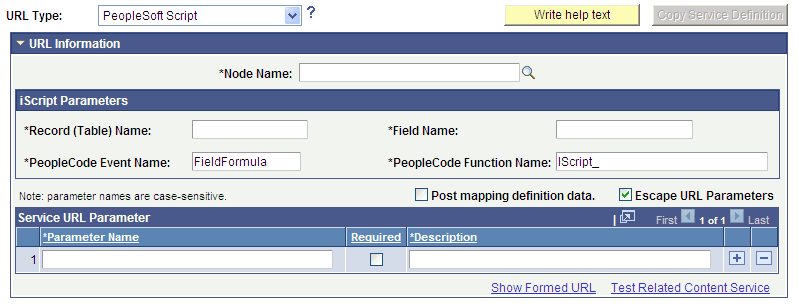
iScript Parameters
| Field or Control | Description |
|---|---|
|
Record (Table) Name |
Enter the name of the WEBLIB_ record where the iScript is stored. |
|
Field Name |
Enter the name of the field where the iScript is stored. |
|
PeopleCode Event Name |
Enter the name of the PeopleCode event under which the iScript is stored. The default event is FieldFormula. |
|
PeopleCode Function Name |
Enter the name of the function that performs the logic of the service. |
Service URL Parameter
Enter the names of all parameters that the iScript must have to render the service in the related content service frame.
PeopleSoft Script URL Example
This is an example of a fully formed PeopleSoft script URL:
http://myserver.example.com/psc/ps/EMPLOYEE/PT_LOCAL/s/WEBLIB_STOCK.ISCRIPT1.FieldFormula.IScript_StockQuote?stockquote=ORCL