Hiding Content References from Menu Search Results
Use the Excluded Content References page to maintain the list of content references that should be excluded from Menu search results.
Access the Excluded Content References page (Select .)
This example illustrates the fields and controls on the Excluded Content References page. You can find definitions for the fields and controls later on this page.
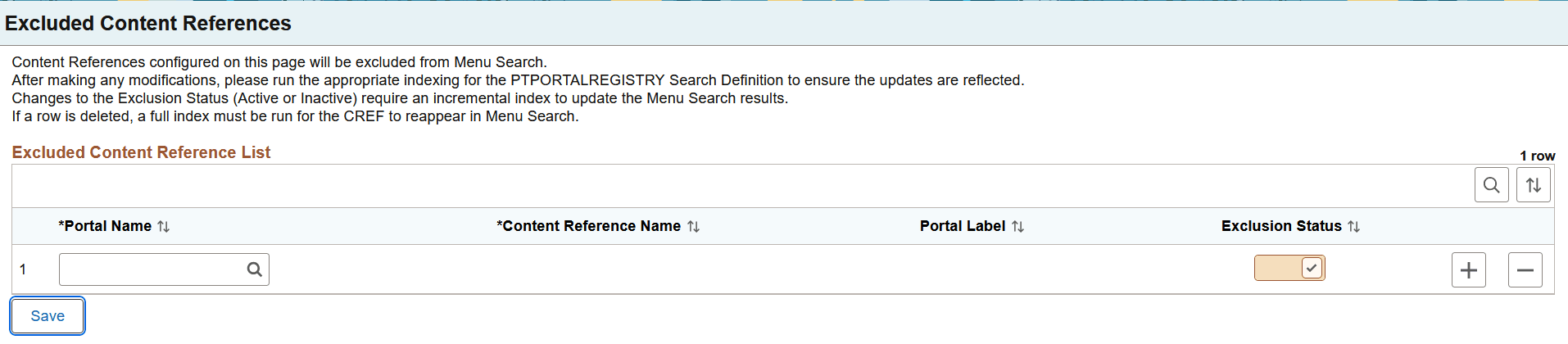
Table 4-1 Excluded Content References page
| Field or Control | Description |
|---|---|
|
Portal Name |
Choose a portal for which you want to specify content references to be hidden. |
|
Content Reference Name |
Choose a content reference. |
|
Portal Label |
The label of the selected content reference is displayed. |
|
Exclusion Status |
Use the Exclusion Status option to specify whether the CREF is actively excluded from Menu search. |
To make a previously hidden CREF appear again in Menu search, use one of the following methods:
- Deselect the Exclusion Status check box, and then run an incremental index for the PTPORTALREGISTRY search definition.
- Delete the required row from the Excluded Content References page, and then run a full index for the PTPORTALREGISTRY search definition.