Importing Menu Groups
Access the Menu Import page. (Select .)
This example illustrates the fields and controls on the Menu Import page. You can find definitions for the fields and controls later on this page.
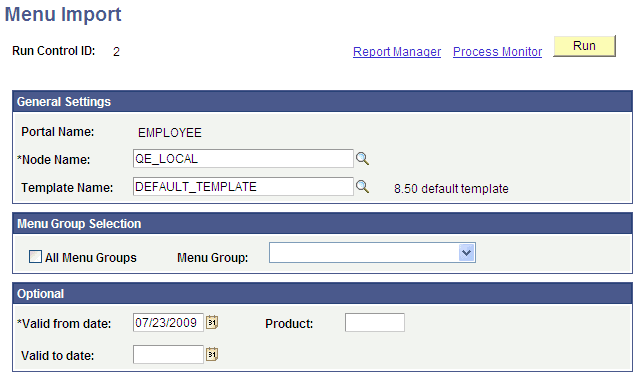
The Menu Import process creates content references for all components that belong to the menu group. This process should be used only to migrate custom menus.
| Field or Control | Description |
|---|---|
|
Node Name |
Select the node of the content provider where the registry structure resides. The default value is the currently running node. Note: Never select the local node for an application database. If you copy the generated content references to a PeopleSoft Interaction Hub database, the content reference assumes that the component resides in the PeopleSoft Interaction Hub database, when it does not. |
|
Template Name |
(Optional) Specify the name of a template for the portal servlet to use. If you leave this field blank, the servlet uses the template that is associated with the selected node. If a template is not associated with the node, the default template is used for all content references that are created by the import process. The default value is the portal's default template. Note: Best practice is to not specify a template so that you can perform a mass template change at the content provider node level instead of having to change each content reference template individually. |
|
All Menu Groups |
Select to import all menu groups. |
|
Menu Group |
Select a menu group to import. |
|
Valid from date and Valid to date |
Specify dates to make visible content references and folders that are associated with the menu that you are importing. In general, use January 1, 1900 for the valid from date and leave the valid to date blank unless you need to limit the time frame. |
|
Product |
Enter a unique, 4-character identifier for the menu. If you perform queries against the database, you can use this identifier to identify items that are associated with the menu. |
|
Run |
Click to begin the import process. PeopleSoft Process Scheduler launches an Application Engine program that imports the selected menu group definitions into the portal registry. This process typically takes several minutes, but can require more time depending on the number of items to be processed. Permission list settings are initially set to conform with the corresponding permissions set for the menu groups being imported. Once the menu group definitions are imported into the portal registry, no dynamic connection exists between the menu group definition in PeopleSoft Application Designer and the portal registry. If you change the security for the menu or component, the registry security is synchronized as long as the menu or component is in the same database as the registry structure. If you change the menu or component name, you must manually update the registry structure. |
|
Process Monitor |
Click to view the status of the menu import. |
After you run the process, click the Home button in the universal navigation header and verify that the menu group has been imported into the portal registry. The new menu group should now appear along with the other folders at the top level.
Note:
If the menu group does not appear, open the folder definition for the menu group and define a label for the folder.