Invoking PeopleSoft Components from Java
All PeopleSoft components can be invoked from Java programs through component interface technology. This is useful for developers who want to create Java servlets, applets, JSP programs, or Enterprise JavaBeans that invoke PeopleSoft business logic. This section provides an example of how to invoke a PeopleSoft component from Java. A Business Expense component is used as the example.
Creating the Component Interface
To expose a component to a third party, you must first create a component interface definition. You do this through the PeopleSoft Application Designer. Using drag-and-drop functionality, you can specify the properties and methods of the component that you want to expose. Numerous component interface definitions are delivered with the each PeopleSoft application.
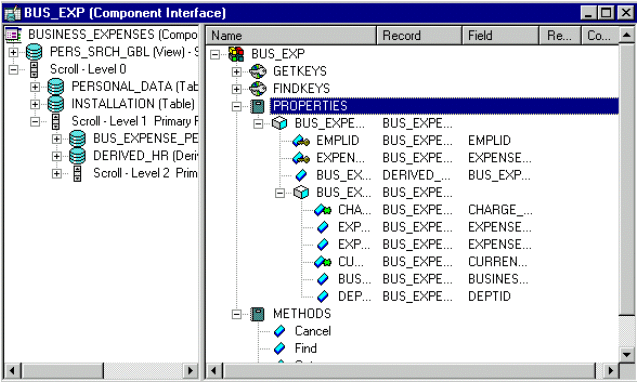
The BUSINESS_EXP component definition appears in the left frame in the following example. The properties and methods that are exposed through this interface are displayed in the right frame.
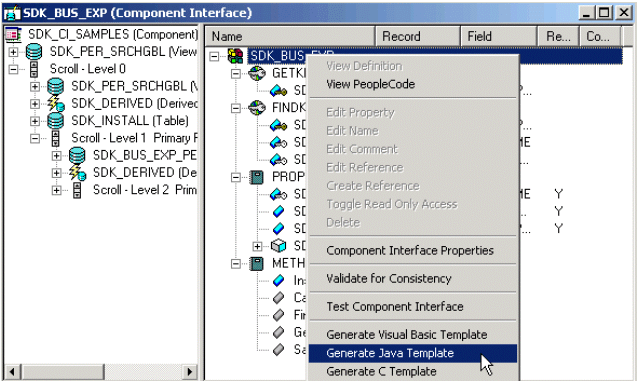
After the component interface definition is saved, you can then generate the Java classes for invoking this interface. You do this using the Generate Java Template command in PeopleSoft Application Designer: This example illustrates generating the Java classes for the SDK_BUS_EXP component interface.
See PeopleCode API Reference: Understanding Component Interface Class.
Invoking the Component Interface from Java
To invoke the Business Expense component interface from Java.
-
Connect to the application server.
To access a component interface, you need to establish a PeopleSoft session. To create a session object, use the Session.Connect () method. The Connect method, which takes five parameters, actually signs in to a PeopleSoft session. The Connect() method connects a session object to a PeopleSoft application server. Note that various options are available for using an existing connection and disconnecting and switching connections.
import PeopleSoft.ObjectAdapter.*; import PeopleSoft.Generated.PeopleSoft.*; import PeopleSoft.Generated.CompIntfc.*; private ISession oSession; private CAdapter oAdapter; oAdapter = new CAdapter(); oSession = new CSession(oAdapter.getSession()); oSession.Connect(1,"//EHARRIS032000:9000","PTDMO","PTDMO",new byte[0]); -
Get an instance of the component interface.
Use the GetComponent() method with a session object to get an instance of a previously created component interface.
busExpense = new CBusExp( oSession.GetComponent( "BUS_EXP" )); -
Find an existing record.
You can query a component interface to find relevant data instances based on primary and alternate search keys.
busExpense.setName( searchDialogStrings[ 0 ]); busExpense.setLastNameSrch( searchDialogStrings[ 1 ]); busExpense.setEmplid( searchDialogStrings[ 2 ] ); return( busExpense.Find() ); -
Get an instance of data.
GetKeys are the key values required to return a unique instance of existing data. GetKeys can be set by means of simple assignment to the properties of the component interface and then the Get() method can be invoked. This populates the component interface with data based on the key values that you set; this has been referred to here as a data instance.
busExpense.setEmplid( getKey ); boolean result = busExpense.Get(); -
Migrate through collections of data.
After getting a data instance, get access to the data in the component interface. PeopleSoft organizes component interface data within collections. Rows of data in a collection are called items.
The following code creates a connection to the application server, gets the component interface, and fetches the first item in a collection.
oAdapter = new CAdapter(); oSession = new CSession(oAdapter.getSession()); oSession.Connect(1,"//EHARRIS032000:9000","PTDMO","PTDMO",new byte[0]); busExpense = new CBusExp( oSession.GetComponent( "BUS_EXP" )); busExpense.setEmplid( getKey ); boolean result = busExpense.Get(); busExpenseFirstScrollItemCollection = busExpense.getBusExpensePer(); busExpenseFirstScrollItem = firstScrollCollection.Item ( firstScrollIndex ); return( busExpenseFirstScrollItem.getBusExpenseDtl() ); -
Edit and access data in an item.
Editing and accessing component interface data in Java is rather straightforward. The following Java code accesses the various public members of the class.
long j = busExpenseSecondScrollCollection.getCount();
Object [][] data = new Object[ ((int)j + 1) ][ 7 ];
for( int i = 1; i < j + 1 ; i++ )
{
busExpenseSecondScrollItem = busExpenseSecondScrollCollection.Item( i );
data[(i - 1)][0] = busExpenseSecondScrollItem.getBusinessPurpose();
data[(i - 1)][1] = busExpenseSecondScrollItem.getChargeDt();
data[(i - 1)][2] = busExpenseSecondScrollItem.getCurrencyCd();
data[(i - 1)][3] = busExpenseSecondScrollItem.getDeptid();
data[(i - 1)][4] = busExpenseSecondScrollItem.getExpenseAmt();
data[(i - 1)][5] = busExpenseSecondScrollItem.GetPropertyByName("ExpenseCd");
data[(i - 1)][6] = busExpenseSecondScrollItem.GetPropertyByName("CurrencyCd");
}return( data );
In the following example, data is accessed by means of the getProperty_Name() method of an item or by means of the generic getPropertyByName() method. This code illustrates the way in which an entire collection of data can be captured and packaged into an object for transfer to a calling object.
busExpenseFirstScrollItem.setEmplid( emplid );
busExpenseFirstScrollItem.setExpensePeriodDt( expensePeriodDt );
return( busExpense.Save() );
Just as before, data is edited by means of item objects and the setNameOfPropery() method of those items. Also note that you needed to call the Save() method on the component interface to commit the changes.
-
Insert an item into a collection and delete an item from a collection.
Collection objects in Java contain the InsertItem() method in which the return value is the item that has just been inserted. After a new item is created, simply edit data in it and then remember to call the Save() method to commit the changes.
busExpenseSecondScrollItem = busExpenseSecondScrollCollection.
InsertItem( secondScrollIndex );
Similarly, a DeleteItem() method is available:
busExpenseSecondScrollCollection.DeleteItem( secondScrollIndex ); -
Disconnect from a session.
After a session is no longer needed, it should be disconnected from the application server. This is done by calling the Disconnect() method on the session object.
oSession.Disconnect();