Publishing Multiple Pagelets to a Portal
Access the Publish Multiple Pagelets page. (Select .)
This example illustrates the fields and controls on the Publish Multiple Pagelets page. You can find definitions for the fields and controls later on this page.
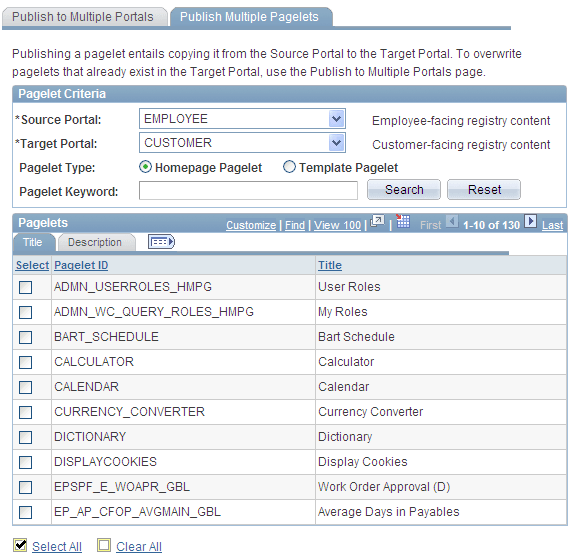
Pagelet Criteria
| Field or Control | Description |
|---|---|
|
Source Portal |
Select the portal from which to copy a pagelet. You can select from portals that reside in the same database where you are currently signed in. |
|
Target Portal |
Select the portal to which you want to copy pagelets. You can select from portals that reside in the same database where you are currently signed in. After you select the source and target portals, the Pagelet group box displays a list of pagelets that are registered in the source portal but not the target portal. |
|
Pagelet Type |
Select the type of pagelet that you want to copy. Options are: Homepage Pagelet: A homepage pagelet is a version of a pagelet that is available for use on the portal homepage and can be configured by the end user. Template Pagelet: A template pagelet is a version of a pagelet that can be added to a PeopleSoft template. These pagelets can extract and leverage keys specified by the target transaction for the template. Publishing a pagelet as a template pagelet is useful when Context Manager or WorkCenter pages are used to display the template pagelet. |
|
Pagelet Keyword |
Enter keywords to narrow the scope of pagelets displayed in the Pagelet group box. |
Pagelets
| Field or Control | Description |
|---|---|
|
Select |
Select to publish selected pagelets to the selected target portal. Use the Pagelet ID, Title, and Description fields on the Title and Description tabs to identify the pagelet. |
|
Publish Selected Pagelets |
Select to copy the pagelet definition from the source portal and publish it to any selected target portals. The portal registry entries for the content references are created in the target portal registry by means of the same values that exist for the original pagelet in the source portal registry. If a folder in which an original pagelet is registered does not exist for a selected target portal registry, it is generated dynamically. |