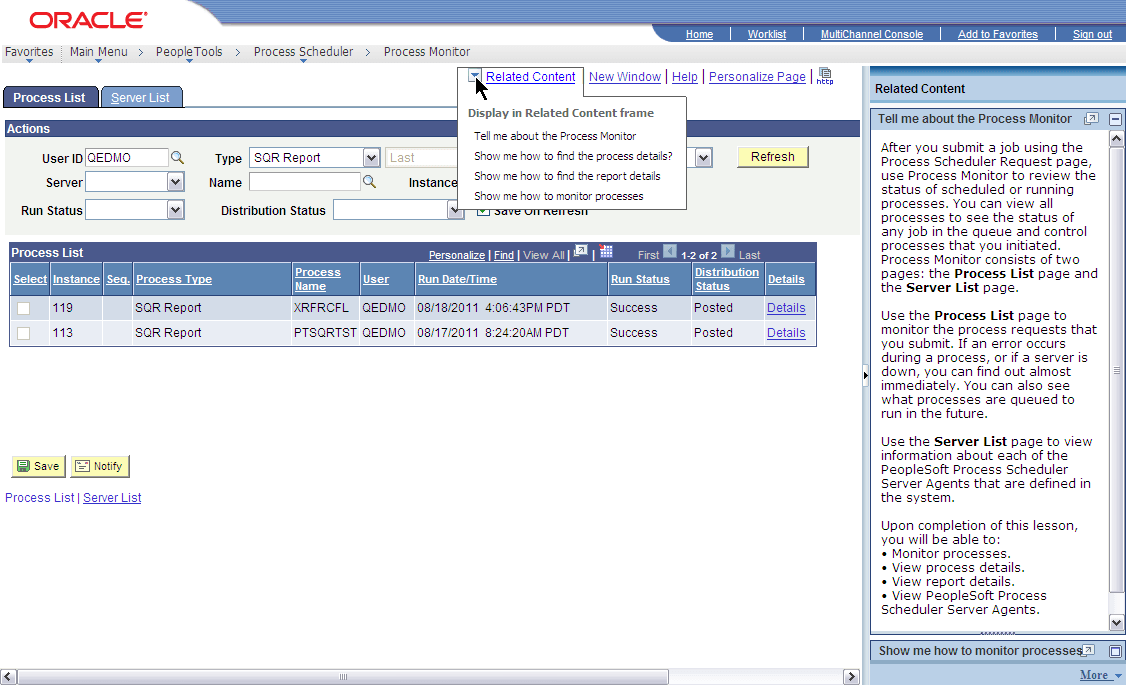
Related Content Menus and Frames
When you assign UPK services to content references, you assign the services as component-level related content only for these reasons:
-
UPK service definitions do not require any parameters; therefore topics cannot be mapped at the field level.
-
Users should be able to access UPK content from the Related Content drop-down menu. Only services assigned as related content appear in the Related Content drop-down menu.
Menu Item Labels
When you create a label for the service, consider the specific context of the service and use direct language. For example, if you want to add a service in which the UPK topic shows users how to submit a process in Do It mode, then Show me how to submit a process is an appropriate label.
Related Content Frames
If you assign the UPK topics to appear in the right frame, users can access multiple help topics simultaneously because they appear in individual pagelets. If you assign UPK topics to the bottom frame, one topic only is visible at a time because they appear in tabs.
Example UPK Topic in Related Content Frame
In this example, the UPK topic appears in the right related content frame: