Setting Up the Pagelet Wizard IB Connector Data Source Security
Access the Define Connector Security - Connectors page. (Select .)
This example illustrates the fields and controls on the Define Connector Security - Connectors page. You can find definitions for the fields and controls later on this page.
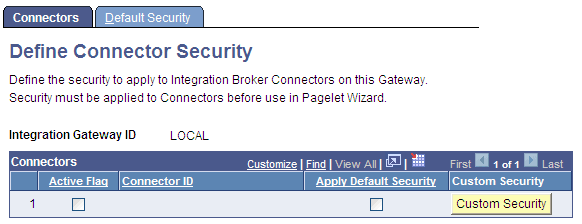
| Field or Control | Description |
|---|---|
|
Integration Gateway ID |
Identifies the Integration Gateway. |
|
Active Flag |
Select to activate the connector and make it available for use with the Pagelet Wizard IB Connector data source. |
|
Apply Default Security |
Select to apply the default security settings that are defined on the Define IB Connector Security - Default Security page to the connector. |
|
Custom Security |
Click to access the Define Connector Security page, where you can define custom security settings for the connector. |