Synchronizing Portal Object Security
Access the Portal Security Synchronization page ().
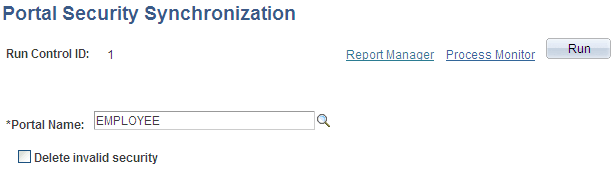
The following example illustrates the Portal Security Synchronization page.
The hierarchical relationships and dependencies between objects in the portal registry determine what security settings each object must have. The portal won't work correctly if these security relationships aren't maintained. Here are some examples of these relationships:
-
A folder that is not public or hidden must have at least the level of access that its immediate child objects (folders, content references, and content reference links) have.
-
A content reference link must have exactly the same level of access as the object (content reference or content reference link) to which it links.
-
A content reference that represents a PeopleSoft component or iScript must have exactly the same level of access as the object that it represents.
Portal object security settings can become unsynchronized when you move portal objects from one database to another using the Project Copy feature in PeopleSoft Application Designer. When you merge projects this way, if the projects contain any portal objects with identical names, the security settings of the portal objects in the last project copied overwrite the security settings of portal objects copied earlier. Also, when a copied portal object doesn't overwrite an existing object, it changes the structure of the resulting portal registry hierarchy.
Use the Portal Security Synchronization page to reinstate the correct security relationships between objects in the portal registry after you copy a project that contains portal objects.
This page enables you to run the Application Engine program PORTAL_CSS from the standard menu navigation. You can use this feature on local portals only, not on portals on remote databases. In addition, from any local portal, you can run this program against another local portal.
To synchronize portal object security, specify a local portal in the Portal Name field and click Run. The portal objects are synchronized in the following way:
-
The security settings of each content reference are compared to the component or iScript that it represents, and updated to match.
-
The security settings of each content reference link are compared to the content reference or content reference link to which it connects, and updated to match.
-
The security settings of each content reference and content reference link are propagated to its parent folder, in addition to the parent folder's existing settings.
None of the parent folder's existing security access is reduced.
Note:
The settings aren't propagated if the parent folder is public or hidden.
-
The security settings of each folder are propagated to its parent folder, in addition to the parent folder's existing settings.
None of the parent folder's existing security access is reduced.
Note:
The settings aren't propagated if the parent folder is public or hidden.
The following warning messages may appear when security synchronization cannot occur:
-
No permissions in PSAUTHITEM for object %1
-
Cref %1 points to Menu: %2, Component: %3 which doesn't exist.
Note:
When this message appears, you need to delete the invalid content reference .
The security administrator and portal administrator are responsible for determining why an object has no security or why an object does not exist.
Delete Invalid Security Option
When you move portal objects from one database to another, roles and permission lists assigned to folders and content references on the source database may not exist on the target database and therefore become invalid. Select the Delete Invalid Security check box on the Portal Security Synchronization page to remove nonexisting roles and permission lists from folders and content references.
Note:
When the Delete Invalid Security option is selected, the PORTAL_CSS process runs more slowly because it checks every role and permission list on every portal registry structure. When a nonexisting role or permission list is found on the portal registry structure, it is removed from that portal registry structure.