Understanding Pagelet Wizard Post-Transformation Processing
Pagelet Wizard enables you to use delivered Pagelet Wizard builder transformation tasks in custom and passthru transformations.
Listed in the order in which they are run in post-transformation processing, the following transformation tasks are not automatically generated for custom and passthru transformations, but they can be added by means of embedded tags:
-
Insert Message Catalog text.
-
Format Date, Time, DateTime, Currency, and Number.
-
Insert content-reference-based links.
-
Insert content reference URLs as text.
-
Generate charts.
-
Insert pagelet headers and footers in specific locations.
These tasks are handled by the Post Transformation step, which is built into Pagelet Wizard.
The following diagram illustrates the point at which the Post Transformation step runs in the process flow for displaying a Pagelet Wizard pagelet.
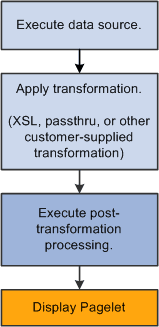
The Post Transformation step runs after the completion of the Transformation step. Following the Post Transformation step, the Pagelet Wizard pagelet appears for the user. Pagelet Wizard uses embedded tags to identify the type of Post Transformation processing that occurs.
Tags that perform these post-transformation tasks can be placed in the HTML for HTML pagelets using the passthru transformation, or in the XSL for pagelets using a custom transformation. For all other transformations—such as chart, list, table, and so forth—Pagelet Wizard automatically generates the tags when necessary. These tags are primarily meant to be used by pagelet designers who want to create custom pagelets using functionality similar to what our delivered Pagelet Wizard builders provide.