UPK Player Package Links
The UPK administrator will have access to the player package link (URL). The link should look similar to this:
http://upkservername/upk/content_subject/toc.html
If you change the player package link ending from toc.html to kp.html you can access the kp.html file.
This is a sample kp.html page:
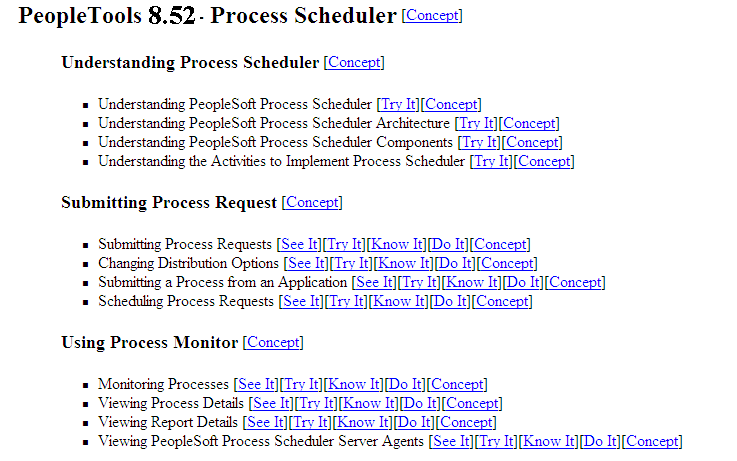
KP.HTML File Topic Modes
Each UPK installation includes a kp.html file that lists your UPK modules and topics. The kp.html file, which is located in the player package folder, enables you to manually link to a specific mode for a topic.
UPK modules can appear in five modes:
-
Do It
-
Know It
-
Try It
-
See It
-
Concept
Right-click the topic link and select Properties to access the topic-specific URL. If you are creating task-oriented related content, right-click the Do It link. If you are creating concept-oriented related content, right-click the Concept link.
The Properties dialog box shows the URL in the Address field. Although the fields on the dialog box are display-only, you can highlight and copy the address as this example shows:
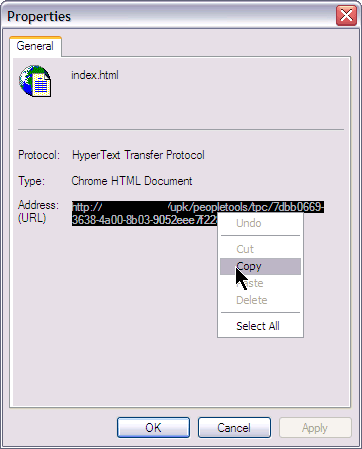
Note these points about the format of the URLs:
-
For task-oriented information, the URL should look similar to this:
http://upkserver/upk/peopletools/dhtml_kp.html?Guid=69f0376e-70fc-417c-a43c-ecd6afb72b29&Mode=D&Back
-
For conceptual information, the URL should look similar to this:
http://upkserver/upk/peopletools/tpc/0350d9a9-6013-4cc9-9022-016f815029ba/Parts/index.html
Use this table to verify that the link accesses the correct mode:
| Link Fragment | Mode |
|---|---|
|
Mode=D |
Do It |
|
Mode=K |
Know It |
|
Mode=T |
Try It |
|
Mode=S |
See It |
|
index.html |
Concept |
For each URL, the &Back fragment
is extraneous for related content purposes. You delete this part of
the URL when you create the service definition.