Working with Related Content in Conditional Navigation
The conditional navigation feature supports the related content features.
Authorization Service
In a system that is not configured for conditional navigation, the related content framework checks for authorization at the level of the input content reference, but in a system that is configured for conditional navigation, the authorization is checked at the level of resolved content reference.
Note:
In a system configured for conditional navigation, you must invoke the authorization service for alternate content references.
See Security Administration: Understanding Developing and Invoking the Security Authorization Service for invoking authorization service.
Suppressing Duplicate Related Actions
Conditional navigation supports the mapping of multiple content references to a single content reference. In such a scenario, related actions configured for these content references will appear multiple times because of the mapping to a single content reference. In conditional navigation, duplicate related actions are suppressed within the context of a folder for fluid.
For example, if related actions are configured on a fluid page for three classic content references — ClassicCREF1, ClassicCREF2, and ClassicCREF3 — and if these three content references are mapped to a single fluid content reference (NUICREF1), in fluid mode, the duplicate related actions are suppressed and the related actions menu will display NUICREF1 only once in the context of a folder. In classic mode, the duplicate related actions are not suppressed and are shown as ClassicCREF1, ClassicCREF2, and ClassicCREF3.
Passing Service URL Parameters to Alternate Content References
Note:
The following information is applicable to fluid mode only.
When you map multiple classic content references with related actions configured to a single fluid content reference, the Service URL Parameters of the first content reference are passed to the mapped fluid content reference. For example, three classic content references — ClassicCREF1, ClassicCREF2, and ClassicCREF3 — with configured related actions are mapped to a single fluid content reference (NUICREF1), by default, the Service URL Parameters of ClassicCREF1 are passed to NUICREF1.
If you want to pass the Service URL Parameters of ClassicCREF2 or ClassicCREF3 to NUICREF1, you can use the PTCS_SUPPRESS service parameter. However, multiple related actions with the same label will be displayed. To avoid this and display the service label instead of the content reference label, you can configure an additional service parameter, PTCS_LABELTYPE.
To define and configure the related content service:
-
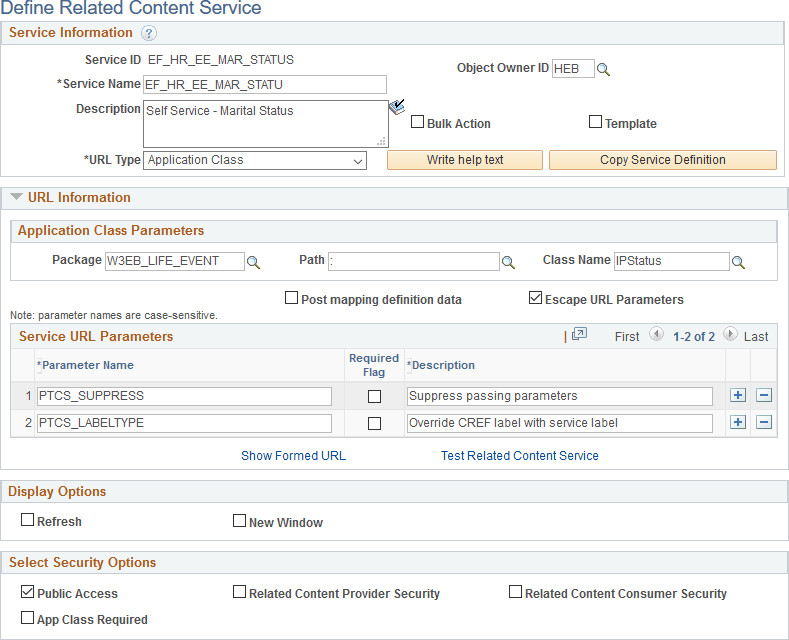
Open the service definition that you want to modify, for example, EF_HR_EE_MAR_STATUS ().
-
In the Service URL Parameters group box:
-
Enter PTCS_SUPPRESS in the Parameter Name field.
-
Enter a description.
-
-
In the Service URL Parameters group box:
-
Enter PTCS_LABELTYPE in the Parameter Name field.
-
Enter a description.
This example illustrates adding two service parameters to the service definition.
-
-
Save the service definition.
-
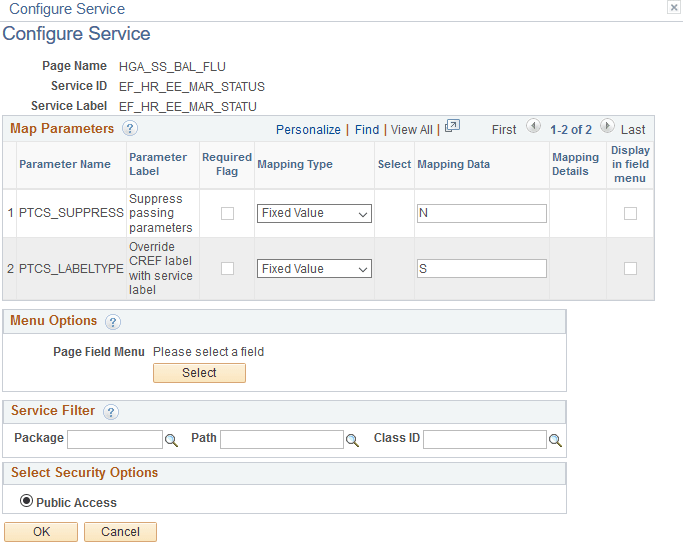
Edit the service configuration of the modified service definition ().
-
On the Configure Service page, for the PTCS_SUPPRESS parameter:
-
Select Fixed Value in the Mapping Type column.
-
Enter N in the Mapping Data column.
-
-
For the PTCS_LABELTYPE parameter:
-
Select Fixed Value in the Mapping Type column.
-
Enter S in the Mapping Data column.
This example illustrates configuring the PTCS_SUPPRESS service.
-
-
Save the configuration.