Entering Global Definitions for Processes
To access the Type Definition page, select
This example illustrates the fields and controls on the Type Definition page. You can find definitions for the fields and controls later on this page.
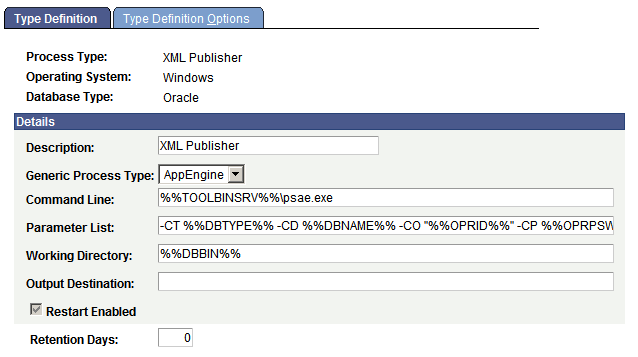
Use the Type Definition page to enter or update global definitions for processes.
A process type must be defined for each database and operating system platform on which you want processes to run. PeopleSoft delivers process type definitions for many of the following types of processes, so if you are adding a new process definition, you may be able to associate it with an existing process type rather than having to add a new one.
-
PeopleSoft Application Engine.
-
SQR.
-
COBOL.
-
Data Mover.
-
XML Publisher.
Note:
XML Publisher is the process type used for BI Publisher reports.
Note:
Be sure to use unique names when defining new process types. This makes it easier to select a process based on the process type.
Important:
Insert two colons (::) to define a colon in any variable string, as in C::\PT80\<executable>, if you are not using the %%<value>%% variable. The extra colon is required to distinguish these types of parameters from in-line bind variables, which use a single colon to prefix the record name.
| Field or Control | Description |
|---|---|
|
Generic Process Type |
Indicates the type of process that you are updating, for example, AppEngine (PeopleSoft Application Engine), COBOL, Cube, Other, SQR, Winword (Microsoft Word for Windows), or nVision (PS/nVision). Note: The Generic Process Type for XML Publisher is AppEngine. |
|
Command Line |
Indicates the executable program based on the generic process type that is selected. Enclose local (client) environment strings within a single pair of percent signs for example, %TOOLBIN%. Enclose all server environment strings within a double pair of percent signs, for example, %%TOOLBIN%%. Note: If the path contains spaces, you will need to add quotation marks around the entry, for example, " %%WINWORD%%\WINWORD.EXE". |
|
Parameter List |
Indicates the string of command line variables that are passed to the program. Note: If the parameter value will contain spaces, you will need to add quotation marks around the argument, for example -OP is entered as, " %%OUTDEST%%. See the Parameter List Formatting section earlier in this topic for more information.. |
|
Working Directory |
The working directory is applicable only to the client and Microsoft Windows servers. If this field is blank, the process will use the server domain directory. Note: For Application Engine process type, the field is used to redirect the APPSRV.LOG file to a valid directory on process scheduler host machine |
|
Output Destination |
Indicates the output destination for this process type. This is used for any process definition with an output destination source of Process Type, meaning that the process uses the values in the process type definition to determine where to send the output. |
|
Restart Enabled? |
Select to enable a process request to be restarted from Process Monitor. Restarting is allowed only if the user or class of users can currently update a request (Cancel or Delete). The parameter list for the failed request is modified to append the current process instance before the request is assigned a new instance and reinserted with a status of Queued. All date and time stamps and runtime variables are reset, as appropriate. Note: If this check box is selected and the request fails, the status is No Success (not Error). |
|
Retention Days |
Set the retention days that are used to determine the expiration date. The expiration date is determined by adding the retention days from the date on which the report was generated. Note: The retention days value entered for a process type will be the default retention days for process definitions using the process type. |
This section discusses the specific values for:
-
PeopleSoft Application Engine process type definitions.
-
SQR report process type definitions.
-
COBOL SQL process type definitions.
-
Data Mover process type definitions.
-
Essbase Cube Builder process type definitions.
-
XML Publisher process type definitions.
PeopleSoft Application Engine Process Type Definitions
When the generic process type is AppEngine, the Type Definition page contains these fields:
| Field or Control | Description |
|---|---|
|
Command Line |
Indicates the executable program PSAE.EXE, which is preceded by the directory name or environment string where the program resides. |
|
Output Destination |
Not required for PeopleSoft Application Engine processes. |
PSAE.EXE requires the following arguments in the Parameter List field:
-CT %%DBTYPE%% -CD %%DBNAME%% -CO "%%OPRID%%" -CP %%OPRPSWD%% -R %%RUNCNTLID%% -I %%INSTANCE%% -AI %%PRCSNAME%% -OT %%OUTDESTTYPE%% -FP "%%OUTDEST%%" -OF %%OUTDESTFORMAT%%
To start an Application Engine program from the command line, you must specify the Application Engine executable (PSAE.EXE) followed by the required parameters, as shown in the following example:
psae -CT dbtype -CS server -CD database_name -CO oprid
-CP oprpswd -R run_control_id -AI program_id
-I process_instance -DEBUG (Y|N) -DR (Y|N) -TRACE tracevalue
-DBFLAGS flagsvalue -TOOLSTRACESQL value -TOOLSTRACEPC value
-OT outtype -OF outformat -FP filepath
Following these arguments, you can add additional arguments, as needed. This table contains details about the required and optional arguments that apply to all PeopleSoft Application Engine process requests.
| Flag | Value and Notes |
|---|---|
|
-CT |
Connect database type. |
|
-CS |
Connect server name, if required on sign-in dialog page. |
|
-CD |
Database to which you are connected. |
|
-CO |
User ID with which you are signed in. |
|
-CP |
User password (encrypted). |
|
-R |
Process run control ID. |
|
-I |
Process instance. |
|
-AI |
Name of the PeopleSoft Application Engine program. |
|
-FP |
The full path of the directory where files will be generated through FileObject. To use the value that is assigned to this flag, use the PeopleCode system variable %FilePath |
|
-DEBUG |
Enables PeopleSoft Application Engine trace. This is equivalent to values that are assigned to TraceAE in the Process Scheduler Configuration file. |
|
-DBFLAGS |
Bit flag that enables or disables running statistics to a table when the meta-SQL %Update Stats% is coded in the PeopleSoft Application Engine program: 0: Enable. 1: Disable. |
|
-TOOLSTRACESQL |
Enables PeopleSoft SQL trace. This is equivalent to values that are assigned to TRACESQL in the Process Scheduler Configuration file. |
|
-TOOLSTRACEPC |
Enables PeopleCode trace. This is equivalent to values that are assigned to TracePC in the Process Scheduler Configuration file. |
|
-FP |
File path. |
|
-OT |
Output type: 2: File. 5: Email. 6: Web. |
|
-OF |
Output destination format, such as HTML. |
SQR Report Process Type Definitions
When the generic process type is SQR, the Type Definition page contains this field:
| Field or Control | Description |
|---|---|
|
Command Line |
Indicates the executable program PSSQR.EXE, a wrapper program to run SQR reports. |
Important:
PSSQR.EXE is not designed to run manually outside of Process Scheduler.
PSSQR.EXE requires the following arguments in the Parameter List field:
-CT -CT %%DBTYPE%% -CS %%SERVER%% -CD %%DBNAME%% -CA %%ACCESSID%% -CAP %%ACCESSPSWD%% -RP %%PRCSNAME%% -I %%INSTANCE%% -R %%RUNCNTLID%% -CO %%OPRID%% -OT %%OUTDESTTYPE%% -OP "%%OUTDEST%%" -OF %%OUTDESTFORMAT%% -LG %%LANGUAGECD%%
Note:
If the path for the Log/Output Directory in the psprcs.cfg contains spaces, you will need to add quotation marks around the argument for -OP as shown in the preceding example, " %%OUTDEST%%".
Following these arguments, you can add additional arguments, as needed. This table contains details about the required and optional arguments that apply to all SQR process requests.
| Flag | Value and Notes |
|---|---|
|
-CT |
Connect database type. |
|
-CS |
Connect server name, if required on the sign-in page. |
|
-CD |
Database to which you are connected. |
|
-CA |
Access ID with which you are signed on. |
|
-CAP |
Access password (encrypted). |
|
-RP |
Name of the report (SQR) file. No path is required. . |
|
-I |
Process instance. |
|
-R |
Process run control ID. |
|
-CO |
User ID with which you are signed in. |
|
-OT |
Output type: 0: Any. 1: None. 2: File. 3: Printer. 5: Email. 6: Web. 7: Default. |
|
-OP |
Output path. If the output type is 1 (printer), you can specify a logical printer name, such as \\printserver1\printer1. If the output type is 2 (file), you must specify a file path. |
|
-OF |
Output destination format, such as HTML. |
|
-LG |
Defines the requested language code for the specified SQR report. |
Note:
Determine the output format for the output file by specifying the output format on the Process Scheduler Request page.
COBOL SQL Process Type Definitions
When the generic process type is COBOL, the Type Definition page contains these fields:
| Field or Control | Description |
|---|---|
|
Command Line |
Indicates the command to start the Windows-based COBOL program, preceded by the directory name or environment string that indicates where the program resides. |
|
Output Destination |
Not required for COBOL. |
Data Mover Process Type Definitions
When the generic process type is Data Mover, the Type Definition page contains this field:
| Field or Control | Description |
|---|---|
|
Command Line |
Indicates the executable program PSDMTX.EXE, which is preceded by the directory name or environment string where the program resides. |
PSDMTX.EXE requires the following arguments in the Parameter List field:
-CT %%DBTYPE%% -CD %%DBNAME%% -CO %%OPRID%% -CP %%OPRPSWD%% -I %%INSTANCE%%
Following these arguments, you can add additional arguments, as needed. This table contains details about the required and optional arguments that apply to all PeopleSoft Data Mover process requests.
| Flag | Value and Notes |
|---|---|
|
-CT |
Connect database type |
|
-CS |
Connect server name, if required on logon dialog page. |
|
-CD |
Database to which you are connected. |
|
-CO |
User ID with which you are signed in. |
|
-CP |
User password (encrypted). |
|
-I |
Process instance. |
Essbase Cube Builder
When the generic process type is Essbase Cube Builder, the Type Definition page contains these values:
| Field or Control | Description |
|---|---|
|
Command Line |
Indicates the executable program PS2ESSBASE.EXE. |
|
Output Destination |
Not required for Essbase Cube Builder. |
PS2ESSBASE.EXE requires the following arguments in the Parameter List field:
-CT%%DBTYPE%% -CD%%DBNAME%% -CO%%OPRID%% -CP%%OPRPSWD%% -I%%INSTANCE%% -R%%RUNCNTLID%% -OP "%%OUTDEST%%"
This table contains details about the required flag that apply to Essbase Cube Builder process requests.
| Flag | Value and Notes |
|---|---|
|
-CT |
Connect database type. |
|
-CD |
Database to which you are connected. |
|
-CO |
User ID with which you are signed in. |
|
-CP |
User password (encrypted). |
|
-I |
Process instance. |
|
-R |
Process run control ID. |
|
-OP |
Log files output destination |
XML Publisher Process Type Definitions
When the process type is XML Publisher, the generic process type is AppEngine and the Type Definition page contains these fields:
Note:
XML Publisher is the process type used for BI Publisher.
| Field or Control | Description |
|---|---|
|
Command Line |
Indicates the executable program PSAE.EXE, which is preceded by the directory name or environment string where the program resides. |
|
Output Destination |
Not required for PeopleSoft XML Publisher processes. |
PSAE.EXE requires the following arguments in the Parameter List field:
-CT %%DBTYPE%% -CD %%DBNAME%% -CO "%%OPRID%%" -CP %%OPRPSWD%% -R %%RUNCNTLID%% -I %%INSTANCE%% -AI %%PRCSNAME%% -OT %%OUTDESTTYPE%% -FP "%%OUTDEST%%" -OF %%OUTDESTFORMAT%%
Following these arguments, you can add additional arguments, as needed. This table contains details about the required and optional arguments that apply to all PeopleSoft XML Publisher process requests.
| Flag | Value and Notes |
|---|---|
|
-CT |
Connect database type. |
|
-CS |
Connect server name, if required on sign-in dialog page. |
|
-CD |
Database to which you are connected. |
|
-CO |
User ID with which you are signed in. |
|
-CP |
User password (encrypted). |
|
-R |
Process run control ID. |
|
-I |
Process instance. |
|
-AI |
Name of the PeopleSoft Application Engine program. |
|
-OT |
Output type: 2: File. 3: Printer. 5: Email. 6: Web. |
|
-FP |
The full path of the directory where files will be generated through FileObject. To use the value that is assigned to this flag, use the PeopleCode system variable %FilePath |
|
-OF |
Specifies the output destination format, such as HTML. |
|
-DEBUG |
Enables PeopleSoft Application Engine trace. This is equivalent to values that are assigned to TraceAE in the Process Scheduler Configuration file. |
|
-DBFLAGS |
Bit flag that enables or disables running statistics to a table when the meta-SQL %Update Stats% is coded in the PeopleSoft Application Engine program: 0: Enable. 1: Disable. |
|
-TOOLSTRACESQL |
Enables PeopleSoft SQL trace. This is equivalent to values that are assigned to TRACESQL in the Process Scheduler Configuration file. |
|
-TOOLSTRACEPC |
Enables PeopleCode trace. This is equivalent to values that are assigned to TracePC in the Process Scheduler Configuration file. |
Note:
For Process Type XML Publisher, available output options are based on the BI report definition template type.
See BI Publisher for PeopleSoft: Creating Report Definitions.
Related Topics