Logging Levels
The logging system enables you to change the level of detail that is written to the log files. The mechanism that is chosen here uses the concept of a detail level and a fence. Messages are assigned a numeric detail-level value that reflects the importance of the event that triggers the message in the operation of the program. This ranges from simple progress messages (very detailed) to error messages when the program is about to terminate (not detailed).
The fence is used to filter out messages that reflect more detail than necessary in a particular installation. For example, a message must be able to leap the fence to be shown (with a lower number indicating a higher fence). With the fence set to 2, only messages with a detail level that is less than 2 (that is, 0 or 1) appear. The only exception to this is that level 0 messages and messages that are unable to be displayed in the standard message format cannot be filtered out.
The meaning of a level is completely arbitrary, although a consistent convention should be followed. The server uses the following convention:
| Fence Level | Description |
|---|---|
|
0 |
Errors, critical messages, and connection header only. |
|
1 |
Critical events. For PeopleSoft Process Scheduler, this includes process start attempts. |
|
2 |
Warnings. |
|
3 |
Informational. This is the default fence value. |
|
4 |
Trace level 1 detail. |
|
5 |
Trace level 2 detail. This shows all messages that are available. |
The fence is determined by an entry in the server configuration file in the [Process Scheduler] section named LOGFENCE. Normal values are in the range of 0−5, with the default being 3 (informational). A setting of 5 is recommended for installation and troubleshooting. A setting of 0 is good for an installed system that is working smoothly.
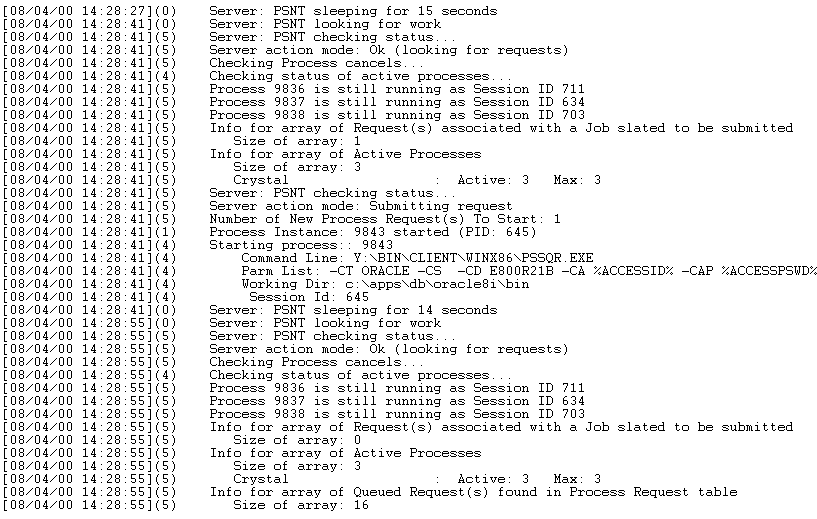
The log fence of a message can be seen in the PeopleSoft Process Scheduler log file.
This example shows the numeric values enclosed in parentheses following the date and time
If you receive error messages, complete the following tasks to enable debugging and tracing:
-
Set LOGFENCE=5 in the psprcs.cfg file.
-
Set TraceSQL to the appropriate value to generate the SQL trace.