Setting Destination Options
Access the Destination page (). Select the Destination tab.
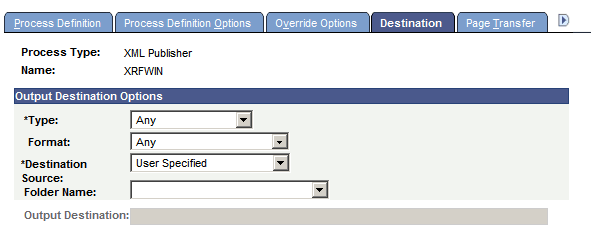
This example illustrates the fields and controls on the Destination page. You can find definitions for the fields and controls later on this page.
Note:
The output source destinations are enforced for users who are not allowed to override the output destination by their user process profiles. If a user is allowed to override it, the user-run control destination is used in the process request.
| Field or Control | Description |
|---|---|
|
Type |
Select the default destination type for this process: None: Uses the user run control values. Any: User can specify any valid option. Default: Applicable to PS/nVision only. Depending on the type of process, other selections include Email, File, Printer, Window, and Web. The value that is specified here overrides the value that is specified in the System Settings - Process Output Type page. If the value that is specified here is deactivated, the value that is designated as the default will be used. |
|
Format |
Select the format for this process. The value that is specified here overrides the value that is specified in the System Settings - Process Output Format page. If the value that is specified here is deactivated, the value that is designated as the default will be used. |
|
Destination Source |
Specify the output destination source for this process: None: Use for processes that do not create output or for processes for which you do not want to produce an output file or report. Process Definition: This request uses the output destination that is specified by the process definition. Process Type Definition: This request uses the output destination that is specified by the process type definition. User Specified: This is the default value. The SQR process will always use values as specified in a run control by the user. So, we need to specify the Destination Output as User Specified. |
|
Folder Name |
Select the folder in which the report will be displayed in the Explorer and List tables of the Report Manager. |
|
Output Destination |
Use to hard-code the output destination into the process definition. This option is enabled only when the source value is Process Definition. |