Understanding the Purge Process
When PeopleSoft Process Scheduler is set to perform a periodic purge it triggers the application engine program PRCSYSPURGE. This purge process is used to empty the PeopleSoft Process Scheduler tables and file system. This includes deleting data from Process Request and Report Manager tables, purging reports from the Report Repository and archiving data into the Report Archive table. You can also enable or disable statistics.
See Understanding the Purge Reports Process.
System Purge Options
The PRCSYSPURGE program is scheduled to run based on the settings maintained on the System Purge Options page. Once the settings are saved, the PRCSYSPURGE application engine program will be scheduled to run at the selected interval.
Select and select the System Purge Options tab.
This example illustrates the fields and controls on the System Purge Options page.
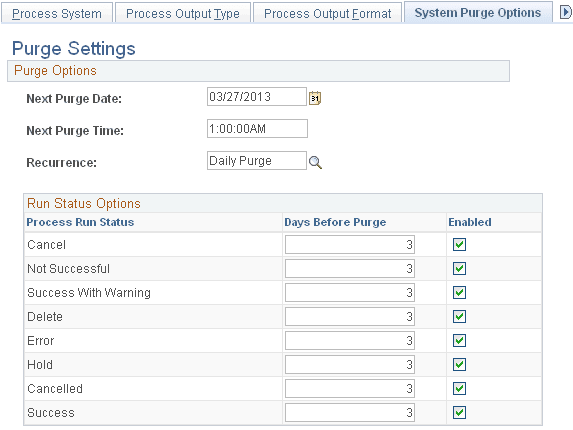
The purge schedule is defined by entering a Next Purge Date, Next Purge Time and selecting a Recurrence schedule.
The Run Status Options list contains a list of process request run statuses that are eligible to be purged. Only completed processes or jobs are eligible for purge. The Days Before Purge entry is used to specify how long requests that complete with the corresponding run status should remain in the Process Request tables. All process requests with an Enabled run status and last update date past the Days Before Purge value specified for that run status will be purged.
Note:
The purge process will not run unless the user ID that starts the Process Scheduler has TLSALL listed as a process group within the primary process profile. The PRCSYSPURGE program is delivered with the TLSALL process group.
Report Retention Days
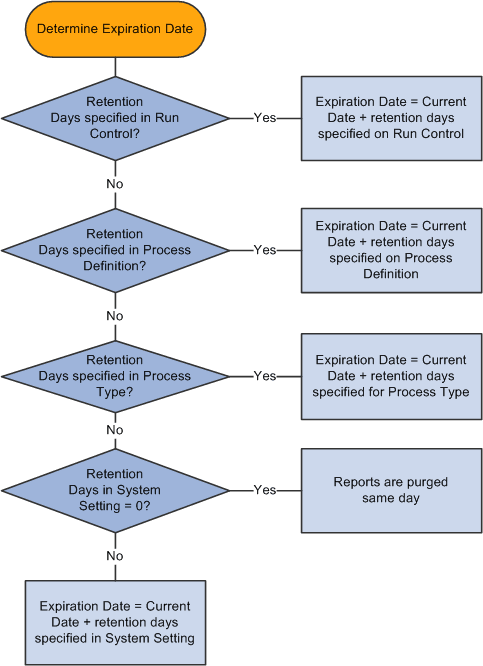
The expiration date for a report is determined by adding the reports retention days to the date the report was run. Retention days for a report can be set at various levels. The system determines the retention days for the report at runtime in the order:
-
Run Control record
-
Process definition
-
Process Type definition
-
System Setting
This diagram illustrates the precedence for determining the number of retention days for the report