Layout and Instance Example
To help you visualize the relationship between a report layout and a report instance, this section includes a sample matrix layout with unique data selection criteria for individual rows and columns.
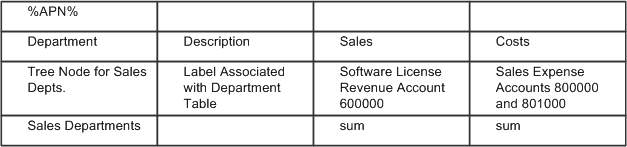
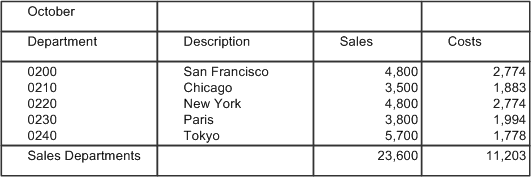
The following layout is an example of a report based on the layout. The Sales and Costs columns specify account numbers, and the rows specify department numbers.
In the final report, each cell contains the data for the account number (column) and department number (row) that intersect at that cell.
The sample layout contains several types of information:
-
Text
This refers to text that appears as-is in all report instances. In the sample above, the column headings—Department, Description, and so on—are standard text that remains the same in all reports created from the layout.
-
PS/nVision variables
PS/nVision replaces variables with values when you run a report. The sample layout uses the %APN% variable for the time period reported on. When PS/nVision creates a report with this layout, it replaces the variable with the period covered by the report. If you use a scope to produce multiple instances of a report, you can use variables in the report heading so each reader knows what data the report contains.
-
PS/nVision labels
PS/nVision examines the tree structure and determines where to obtain the appropriate label for either a tree node or a detail value. In the example, PS/nVision relates a sales department description to the department table entry for each department corresponding to the Sales Depts tree node.
-
PS/nVision selection criteria
Selection criteria specify the data to retrieve from your PeopleSoft database. For example, the Sales column in the sample layout has criteria that direct PS/nVision to retrieve data from the Sales account.
-
Microsoft Excel formulas
These formulas perform calculations on the report data. In the example, the bottom row automatically displays totals of the Sales and Costs columns. You could add a calculated column, Gross Income, calculated via an Excel formula that subtracted Costs from Sales.
-
Formatting
Formatting information includes attributes such as font size, underlining, column width, print options, and so on. You design your layouts using familiar Excel methods; any formatting and enhancements you place in the layout appear in all reports created from it.