Opening Existing Report Requests
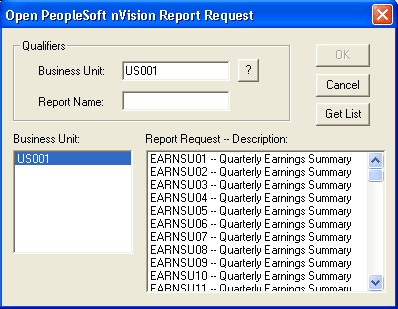
Use the Open PeopleSoft nVision Report Request dialog box to enter the Business Unit and the Report Name.
This example illustrates the fields and controls on the Open PeopleSoft nVision Report Request dialog box.
To open an existing report request in PS/nVision:
-
With a layout opens, selecting nVision, Report Request from the nVision menu.
-
Click the Open button on the PeopleSoft nVision Report Request dialog box.
-
Enter a business unit.
-
Click the Get List button to display a list of report requests in the Report Request list box.
After you click the Get List button, if the Report Request list box is too long to scroll through, enter a partial report name and click the Get List button again.
-
Click a report request and click the OK button, or double-click a request name in the Report Request list box.
The Open PeopleSoft nVision Report Request dialog box closes and the report request information appears in the PeopleSoft nVision Report Request dialog box.