Using DrillDown
DrillDown enables you to select a cell in a parent report and expand it according to new criteria contained in a special DrillDown layout. This is useful when reporting is based on summary ledgers, as it provides underlying details when and where they are needed.
Note:
Although you create DrillDown layouts in PS/nVision on the Windows client, you can run DrillDown from a browser on any parent report that you have access to in Report Manager.
The following report was run based on the Bal layout delivered with the PeopleTools Demo database (PTDMO). By expanding the nPloded rows, you can review details about the data in the report. If you want to review the balances by account and business unit, and this is not in your original report layout, you can create a DrillDown layout that expands cell data to show the breakdown by account and business unit.
In this example, C36 is the cell we are drilling down on, representing the total assets for the period.
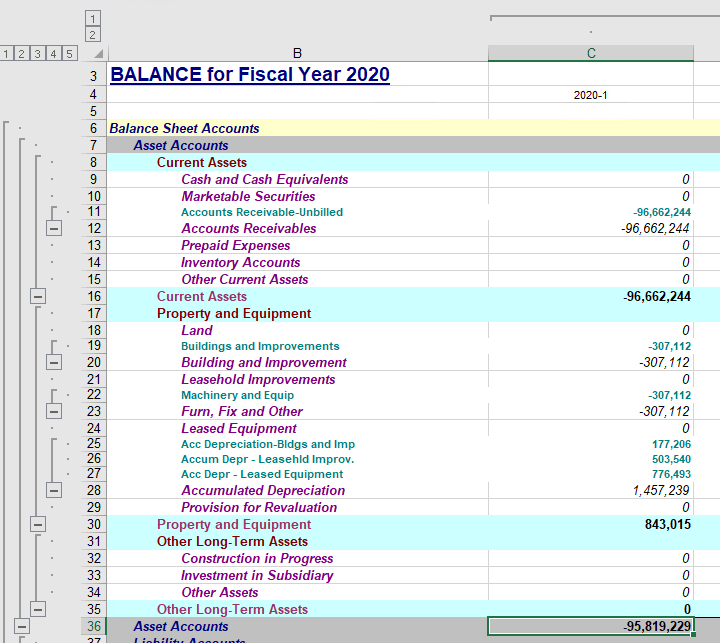
After selecting a cell, pick the DrillDown layout you want to use from the nVision, DrillDown menu. The results appear in a DrillDown report.
This example shows the results in a DrillDown report.
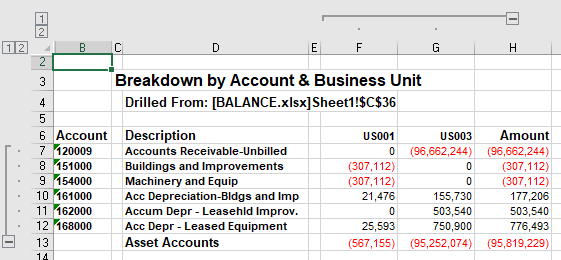
The DrillDown layout inherits all the criteria of the selected cell on the original report and provides a sub-report with the details you need.
Because DrillDown depends on child layouts, you might want to create a library of common layouts to use. These might include:
-
Accounts by department.
-
Products by cost center.
-
Accounts by period.
Your system comes with a number of generic reports, and you can tailor or clone these reports as needed. Many of these layouts employ nPlosion, so you can view both summary and detail levels in your sub-report.
You can also perform a series of DrillDowns on cells in reports until you have reached the level of detail that you need.
DrillDown is available from matrix layouts only. However, the layout that displays the results of the DrillDown can be either matrix or tabular. For example, you might produce a financial report using a matrix layout, and then select one of the amounts and drill down to another matrix layout that breaks down the departments and products that were summarized into that amount. From that report, you might select a department/product combination and drill down, this time using a tabular layout that queries the individual sales transactions. This is the end of the DrillDown trail, because you can drill further only from a matrix report.
Note:
A PeopleTools upgrade may change the web server domain name, port number, or servlet path required to access web server resources in the PeopleSoft Pure Internet Architecture. As a result, PS/nVision drilldown operations on reports that were created before upgrade would fail, primarily because drilldown links are, by design, hard-coded into PS/nVision reports. This is UpdateNvsDrill.xls. We have provided a simple search and replace utility that you can use to replace old links with new ones. This Excel macro, along with all other Excel macros, is located in the PS_HOME\Excel directory.
Drilldown reports use the following naming convention to improve report identification and traceability:
<DrilldownLayoutName>_<ParentReportInstance>_<CurrentReportInstance>_<ParentReportName>| Component | Description |
|---|---|
|
DrilldownLayoutName |
DrillDown layout used to generate the report |
|
ParentReportInstance |
Report instance of the parent report from which the drilldown was initiated |
|
CurrentReportInstance |
Generated drilldown report instance |
|
ParentReportName |
Originating parent report |
Related Topics