Using the Style Sheet Wizard
You can use the Style Sheet Wizard exclusively to create and edit nPlosion styles, which are stored in a special Excel worksheet provided with PS/nVision.
This example illustrates the fields and controls on the nVision nPlosion Style Wizard window.
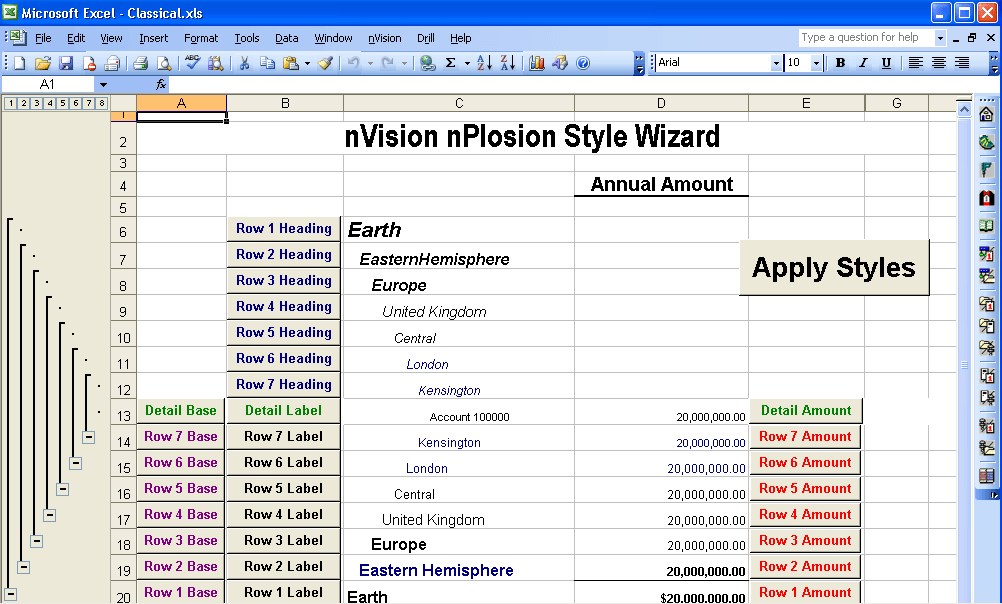
There are two nPlosion styles:
-
The RowStyles tab displays Row styles.
-
The ColumnStyles tab displays Column styles.
Seven levels of each style are provided, as well as a separate style for detail values.
The Style sheet Classical.xls is delivered with PS/nVision. You can create your own style sheet wizard by saving the Classical.xls file under a different name in the Style Sheet directory location. Configure the Style Sheet directory location using the Configuration Manager.
Note:
You can override the base style by modifying any of the other styles that come after it. For example, you could make a particular field shaded, even though the base style for that row or column does not include shading.