Creating Outer Joins
An outer join forces a row from one of the participating tables to appear in the result if no matching row exists.
Note:
You can create an outer join using this method only if you have an Oracle database. If you use a platform other than Oracle database, you can create an outer join equivalent or create a left outer join using PeopleSoft Query's left outer join feature.
The Outer Join functionality is available only in Query Manager. This functionary is not available in the 2–3 Tier Query Client.
See Creating Left Outer Joins.
To create an outer join, you must include a plus sign in parentheses (+) after the key fields of the subordinate record in the criteria that link the records. To produce this syntax, you cannot use the predefined joins. You must perform an any record join and code an expression that contains the (+) instead of a field.
You can join only one child record to the same parent query when the child record is added using the Records page. If you join more than one child record to the same parent query, an error message appears that says: "Left Outer joins must be joined to the last record in the query". On the contrary, you can have multiple outer joins to the same parent table if those joins are added using the Hierarchy joins link in the Query page.
This example illustrates the fields and controls on the Define Expression section.
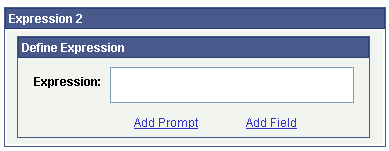
Creating an Outer Join for Oracle Database
To create an outer join for Oracle database:
-
Access the Criteria page
-
From the Criteria page, click the Edit button to the right of the required field from the primary record.
-
In the Condition Type drop-down list, accept the default operator value of Equal To.
-
In the Expression 2 Type section, select the value of Expression.
The Define Expression text box appears.
-
Click the Add Field link.
-
Select the required field from the secondary record.
-
Manually enter (+) after the field name.
-
Click the OK button.
Creating an Outer Join Equivalent for non-Oracle Platforms
If you use a platform other than Oracle, use this method to achieve the same effect as an outer join.
Note:
If you use a platform other than Oracle, you can also create a left outer join using PeopleSoft Query's left outer join feature.
For example, to retrieve a list of all students and any evaluation information on file, the first select must retrieve those students who have not completed an evaluation; the second select must retrieve those students who have completed an evaluation.
To perform an outer join equivalent for the previous example:
-
In Query Manager create a new query or updating an existing query using the Student_Data record.
-
Select the Customer_ID and Name fields.
Because you will select two different fields from the Student_Eval record and you want them to have their own columns, you must create two dummy fields for your first record.
-
Create two different expressions and select them for output.
-
Save the query.
-
Create your subquery to find those students who have not completed an evaluation.
This completes your first select. If you run the query at this point, you see only those students who did not complete an evaluation.
-
To join in the students who did complete an evaluation, create a union.
-
Using the Student_Data record, select Customer_ID and Name for output.
-
Join the Student_Eval record using a record hierarchy join.
-
Select Course and Course_Rt for output.