Adding and Copying Synonyms
Use the Synonyms page to add synonyms and to copy the synonyms data to the search instance.
Access the Synonyms page by selecting .
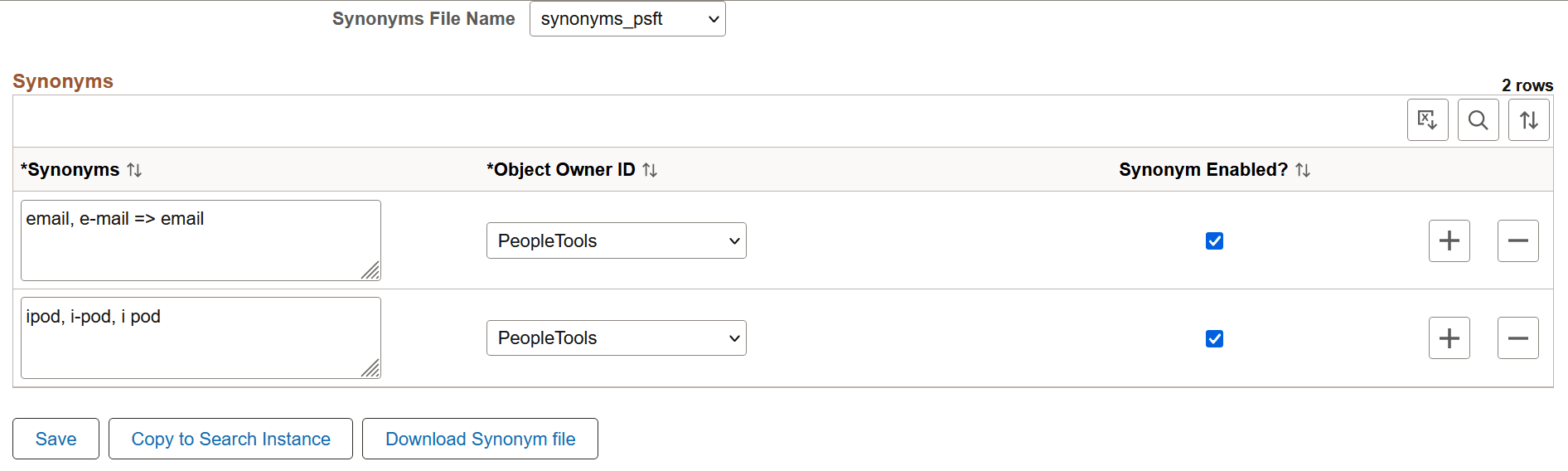
This example illustrates the fields and controls on the Synonyms page. You can find definitions for the fields and controls later on this page.
| Field or Control | Description |
|---|---|
|
Synonyms File Name |
PeopleSoft delivers two files for synonyms. The default file is synonyms_psft.
Note: These file names are static and should not be changed. Note: Synonym files are common to all indexes for which synonym search is enabled. |
|
Synonyms |
Enter synonyms as comma separated values. The synonyms entered here are copied to the configuration file as is. An entry in this format: email, e-mail => email, means that when an end user searches for email or e-mail, they will get search results that contain email; not e-mail. An entry in this format: ipod, i-pod, I pod, means that when an end user searches using any of these keywords, they will get search results that contain all these keywords. Note: PeopleSoft supports the solr synonym format of OpenSearch. |
|
Object Owner ID |
Select the owner of the synonyms. The owner ID helps determine the team that created or modified the synonyms and also helps to segregate the synonyms in the configuration file. |
|
Synonym Enabled |
The Synonym Enabled check box determines whether the synonyms on the row should be added to the selected file. If you do not select the check box, the synonyms are not added to the selected synonym file when you save the file. |
|
Save |
Saves the synonyms to the database. |
|
Copy to Search Instance |
Copies the selected file immediately to the OpenSearch analysis folder (OS_HOME\config\analysis\). You do not have to restart the OpenSearch server. When the copy action is issued, the indexes that are enabled for synonyms are temporarily closed, which might affect indexing if it is in progress. Important: The copy action should not be performed when indexing is in progress. In order for both synonym files to be available in the OpenSearch analysis folder, you must perform the Copy to Search Instance action for both synonyms files. During the copy action, only those blocks relevant to the owner ID are updated. In this manner, when you copy from another environment, it does not overwrite the synonyms as long as the owner IDs are different. For example, in a scenario where an OpenSearch cluster is used for multiple PeopleSoft applications and the synonym file contains both FSCM and HCM entries, and you’re updating synonyms from the FSCM application, the copy action updates only those entries of the FSCM owner IDs. So, if the file has entries of HCM owner IDs, those blocks are not overwritten. The copy action must be performed for all the nodes in a cluster. Before you perform this action, you should ensure that the nodes are configured on the Search Instance page. |
|
Download Synonym file |
Download a copy of the selected synonym file to your local system. Note: Oracle does not recommend that you update the downloaded file manually and copy it to the analysis folder directly. If you do so, the data in the manually edited file can be overwritten when you click the Copy to Search Instance button. If you prefer to manually edit a synonyms file, you can use the synonyms_grammar.txt file because this file is not controlled through PIA. |