Adding Text and Bind Variables for Title and Summary
In the Search Result Title and Search Result Summary pages, you can insert custom text and bind variables, or a combination of the text and bind variables to accurately express the content of the search result document. You can insert multiple bind variables and bind variable types within the title and summary text, as needed.
Note:
In a multi-language situation, only the base language structure for Title/Summary is respected. You cannot change the query fields to be displayed for different languages.
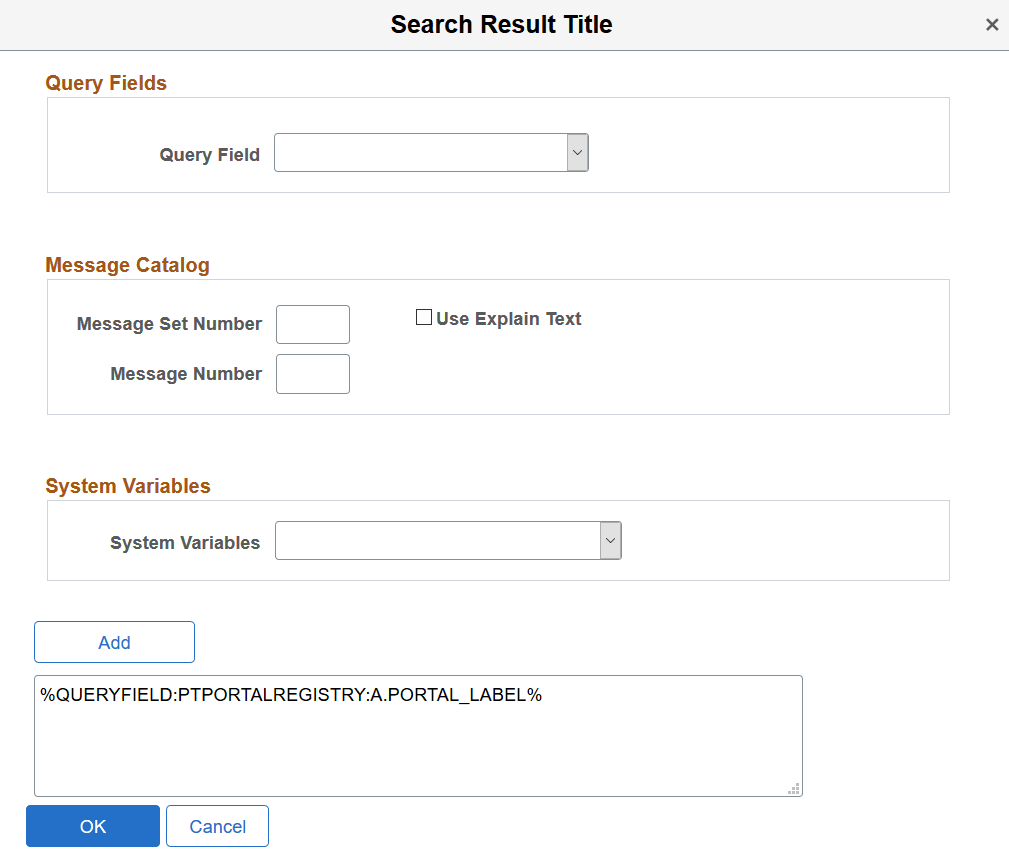
This example illustrates the fields and controls on the Search Result Title page. You can find definitions for the fields and controls later on this page.
| Field or Control | Description |
|---|---|
|
Query Field |
Use the Query Fields drop-down list to select the desired fields from the underlying query of the search definition. |
|
Message Set Number |
Specify the Message Set Number to identify the message set to use. |
|
Message Number |
Specify the Message Number to identify the specific message to display. |
|
Use Explain Text |
By default, the message catalog text (that is, message text of the message catalog entry) is displayed. To use the message catalog explanation (that is, the description of the message catalog entry), select the Use Explain Text check box. |
|
System Variables |
Use the System Variables drop-down list to select the desired variable to display. |
|
Add |
Select Add to form the expression. |
The Search Result Summary page contains similar fields.