Understanding Direct Transfer
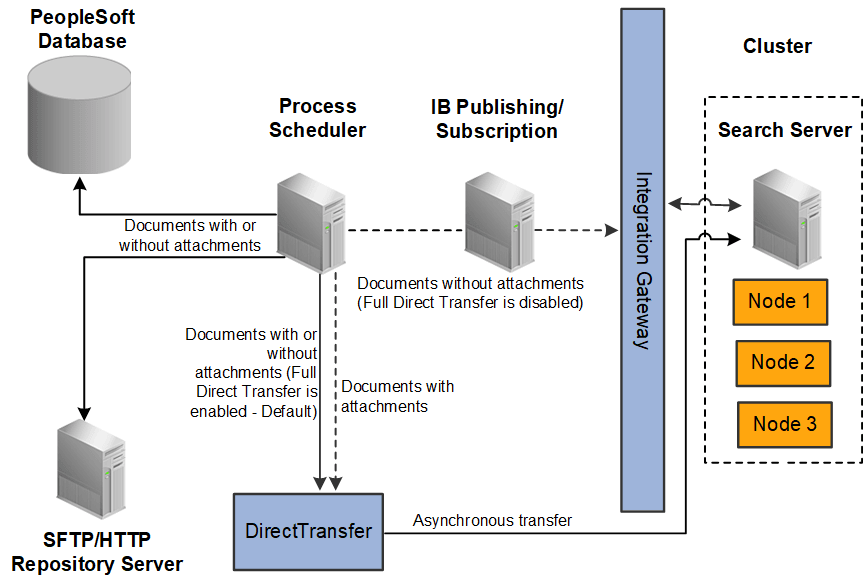
PeopleSoft Search Framework implements Direct Transfer technology to transfer search data (search documents with attachments and search documents without attachments) directly to the search engine bypassing the Integration Gateway. This feature is called Full Direct Transfer, which is the default option in PeopleSoft Search Framework. However, PeopleSoft enables you to choose whether you want to use the Full Direct Transfer option or not. If you choose not to use the Full Direct Transfer option, then search documents without attachments will be transmitted through the Integration Gateway but, the search documents with attachments will be transmitted directly to the search engine.
Direct Transfer technology supports search definitions that are based on Connected Query and Query.
The following graphic depicts PeopleSoft downloading search documents from database, attachment repository, and HTTP repository, and then pushing encoded data to the search engine using Direct Transfer. The search engine uses Mapper attachment plug-in to parse attachment contents for indexing.
To use Direct Transfer, you need to:
-
Complete the configurations required for Direct Transfer.
-
Review the system considerations.
-
Review error handling.