Working with Search Categories
Search categories enable you to group search definitions within logical, manageable groups. You define search categories within the Search Framework Designer Activity Guide.
To manage search categories, access the Deploy Search Categories page by selecting .
This example illustrates the fields and controls on the Deploy Search Category page. You can find definitions for the fields and controls later on this page.
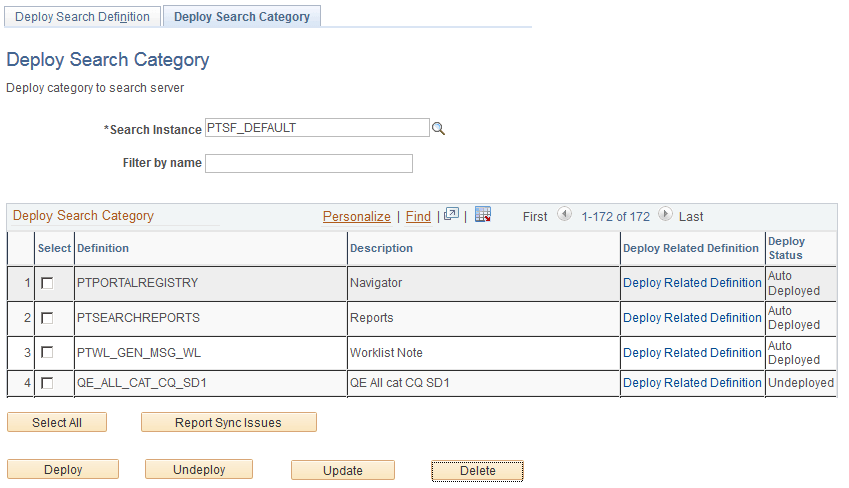
| Field or Control | Description |
|---|---|
|
Search Instance |
Use to display only those search categories associated with a particular search instance. |
|
Filter by name |
Use to enter full or partial definition names to reduce the list of search categories appearing in the grid. |
|
Deploy Search Category (grid) |
Displays all existing search categories defined in the Search Framework. Columns in the grid are:
|
|
Select All |
Click to select all the rows within the grid. Note: If all rows in the grid have been selected, the button label changes to Deselect All. |
|
Report Sync Issues |
Runs an audit checking routine which reports where properties for a search category differ between PeopleSoft and search engine. If you have updated a deployed search category it will no longer be synchronized with the representation on the search engine. Results of this check appear in the Update Status column (which, in the case of differences between the corresponding categories becomes the View Report column). This applies only to deployed categories. |
|
Deploy |
Deploy the PeopleSoft search category to the search engine. Note: You can deploy multiple search categories at a time by selecting the corresponding check box in the first column of the grid and then choosing Deploy. Important: You will receive a warning message when all search definitions contained within a category are not deployed, but as long as one search definition is deployed, you can deploy the search category. |
|
Undeploy |
Click to remove the search category from the search engine. You cannot undeploy an auto-deployed search category. You must undeploy the search definition of the same name and the auto-deployed category will be undeployed. Note: The search category will be removed from the search engine, but it will still exist within the PeopleSoft system. Note: This does not undeploy the search definitions associated with a search category. |
|
Update |
Click to update the representation of the search category on the search engine. If you have modified a deployed search category, the PeopleSoft version and the version on the search engine will no longer match. Categories that need to be updated will appear in the synchronization report. Clicking Update synchronizes the search engine representation of the category to match the PeopleSoft version. |
|
Delete |
Deletes the search category from the Search Framework. Note: This does not delete the search definitions associated with a search category. Warning! This is not reversible! Oracle PeopleSoft does not recommend deleting delivered search categories. |