Working with Stemming
Stemming enables the system to return search results based on variations of a keyword. When stemming is enabled, the search engine analyzes each word during indexing, derives its algorithmic root form, and stores the root form in the document index.
During a search, the search engine applies the same conversion to the keyword, identifies matching root forms, and retrieves results that contain related words.
For example, universal, universe, and university can get to the common root form univers.
This improves search coverage by returning results even when the exact keyword is not present in the indexed data. However, stemming may return results that are not exact matches.
When stemming is disabled, the system performs exact keyword matching and returns results only when the entered keyword exactly matches the indexed data.
By default, stemming is enabled. Search definitions are indexed using stemming unless you explicitly disable it.
Note:
For a deployed index, the Enable Stemming option is disabled. To modify this setting, you must update the value and redeploy the search definition.You can configure stemming either at the global level using the Search Options page or at the index level during deployment. For more information on Enable Stemming, see Managing General Search Options.
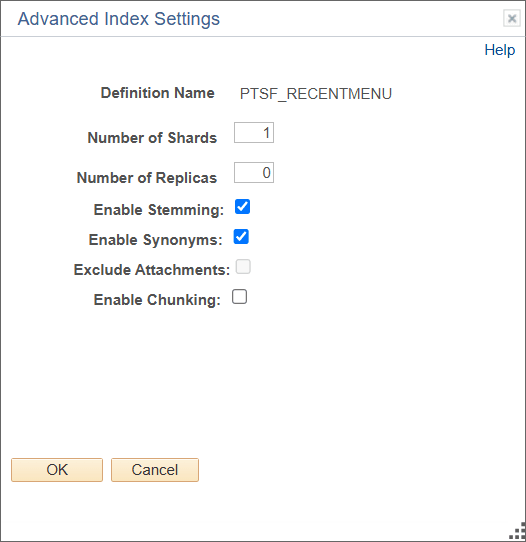
You use the Advanced Index Settings page to override stemming for individual indexes.
Complete these steps to enable stemming search for an index:
- Navigate to and from Administration in the left panel, select Deploy/Delete Object.
- On the Deploy Search Definition page, select the Index Settings link for the desired index.
- On the Advanced Index Settings page, select the Enable Stemming check box.
- Select OK to save your setting.
This example illustrates the Advanced Index Settings page where you enable Stemming search for an index.
You can enable or disable stemming at the system level by using the property available in the Search Options settings. After changing this setting, redeploy the search definition for the changes to take effect.
Note:
When typo tolerance is enabled, a stemming enabled search definition may provide suggestions in the root form rather than as the complete word when an incorrect keyword matches the stemmed word.