Adding a Definition Group from a Project
This section describes how use the Add New Definition from Project page and how to use the page to add a definition group from a PeopleSoft Application Designer project.
Using the Add New Definition Group from Project Page
Use the Add Definition Group from Project page (PTDEFSECSRCH_ADD_P) to add a definition group to the database from a PeopleSoft Application Designer project.
To access the page select and click the Add New Definition Group from Project link.
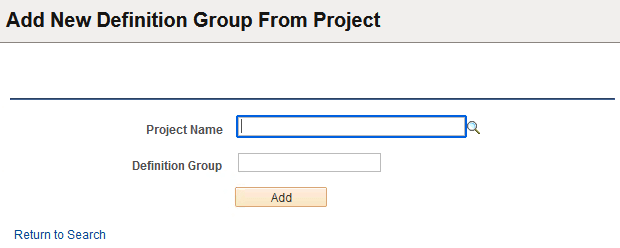
This example illustrates the fields and controls on the Add New Definition Group From Project page. You can find definitions for the fields and controls later on this page.
| Field or Control | Description |
|---|---|
|
Project Name |
Enter the name of the project or click the Lookup button to select one. |
|
Definition Group |
Define the name for the definition group. When you enter or select a project name the system populates this field with the project name by default. You can accept the default value or enter a different name. |
|
Add |
Click the button to add the definition group. After you click the button the new definition group appears in the Definition Groups – Group Content Summary page. |
Adding a Definition Group from a Project
To add a definition group from a PeopleSoft Application Designer project:
-
Access the Add Definition Group from Project page (select and click the Add New Definition Group from Project link).
-
In the Project Name field:
-
Enter the name of the project that contains the definition group to add to the database, or
-
Click the Lookup button to search the database for the project that contains the definition group to add to the database.
-
-
In the Definition Group field, enter the name for the definition group.
By default the system populates the field with the project name.
-
Click the Add button.
The Definition Groups – Content Summary page appears.