Configuring User Validation in Access Tokens
Use the User Validate Mapping Configuration page to define the access token attribute that the OAuth2.0 framework uses to map to PeopleSoft users.
Select .
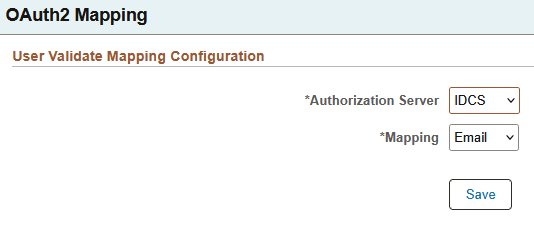
Use this page to configure which access token attribute, email or subject, the OAuth2.0 framework uses to cross-reference PeopleSoft users.
The access token attribute (claim) that is used to define user context depends upon the type of authorization server. For example, IDCS uses subject, and Azure uses email. To determine which users are allowed to use an access token, the OAuth2.0 framework uses these attributes to connect the subject or email information to a valid PeopleSoft user. This gives administrators more flexibility in configuring user validation.
Note:
The administrator that selects a non-default option for the Authorization Server used should consult the authorization server configuration documentation to ensure that the claim selected is properly populated.This example illustrates the User Validate Mapping Configuration page.
| Field or Control | Description |
|---|---|
|
Authorization Server |
Select your authorization server:
|
|
Mapping |
Select the access token attribute to be used to look up the PeopleSoft user:
|