Defining a New Encryption Profile and New Algorithm Chain
Before defining a new encryption profile with a new algorithm chain, you should decide which algorithm you want to use.
To define a new encryption profile and new algorithm chain:
-
Select .
-
On the search page, enter a new Encryption Profile ID and new Algorithm Chain ID.
-
(Optional) Enter descriptions for the profile and chain.
-
Specify the chain options.
-
Enter desired algorithms.
-
Generate the chain.
-
Supply Optional Profile Parameters if desired.
-
When you click Save, the Testing and Paired Profile group boxes appear.
The page now functions the same as it does when you edit or update mode an existing encryption profile.
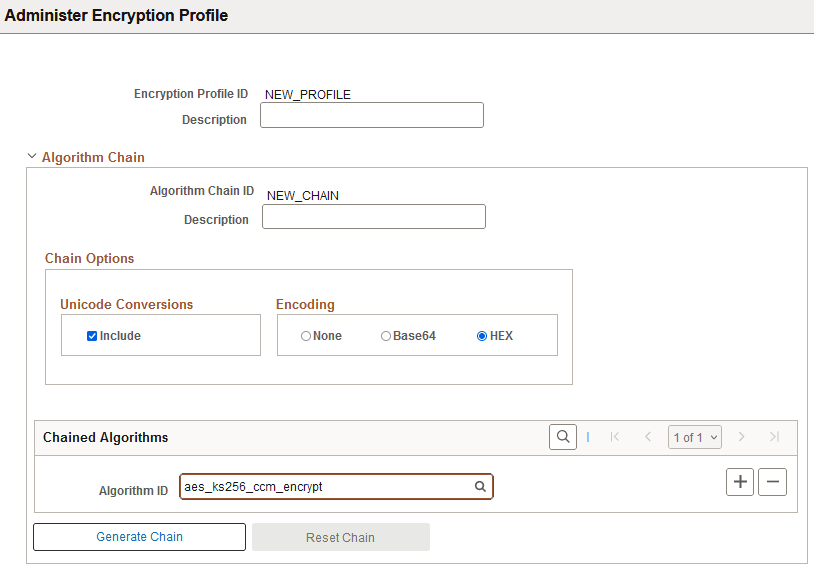
This example illustrates the fields and controls on the Administer Encryption Profile page when creating a new profile and new algorithm chain.
| Field or Control | Description |
|---|---|
|
Unicode Conversions |
Select Include to create a chain with PSUnicodeToAscii as the first algorithm in the chain sequence and PSAsciiToUnicde as the last algorithm in the chain sequence. |
|
Encoding |
Note: In some cases the Encoding settings will be automatically overridden based on the first algorithm specified in the chained algorithms grid. For example, smime and pkcs7 will be forced to have None as the Encoding option. |
|
Chained Algorithms |
Select an Algorithm ID from the available list. Click the plus button (+) to add additional algorithms. |
|
Generate Chain |
The Generate Chain option appears after you select an Algorithm ID. When you click this option the chain sequence for the selected Algorithm ID is displayed. Each algorithm in the chain appears in order, in its own row with its algorithm ID and chain sequence number. If there are associated parameters for an algorithm, you see an expandable Optional Profile Parameters section. |
|
Optional Profile Parameters |
Enter any required parameters for the algorithm. You will only be allowed to enter parameters that are valid for the loaded algorithm. |
|
Reset Chain |
The Reset Chain button appears after you generate the chain. Click this button to remove the list of algorithms and select a different Algorithm ID. |