Defining Role Membership Rules
Access the Role Policy page ().
This example illustrates the fields and controls on the Role Policy page.
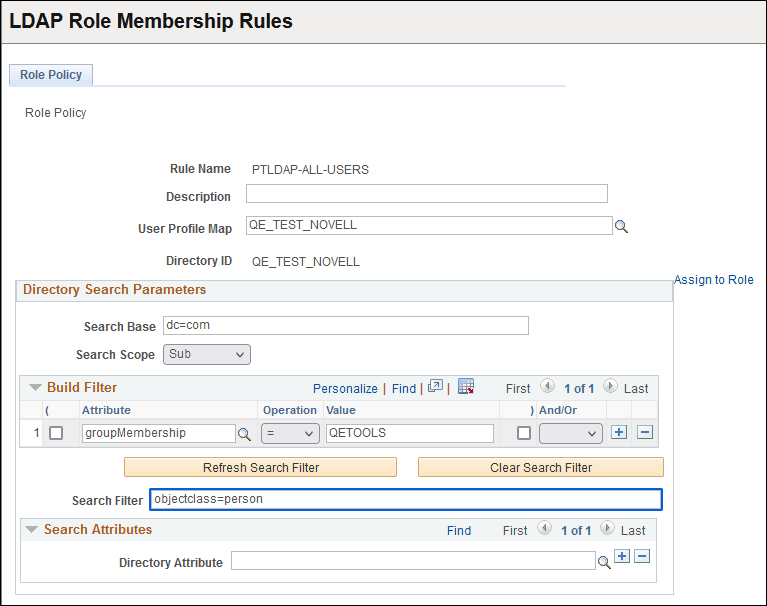
| Field or Control | Description |
|---|---|
|
Rule Name |
Displays the directory search name that you entered on the search page. |
|
Description |
Enter a short description of the rule. |
|
User Profile Map |
Select the user profile map to associate with the rule. |
|
Directory ID |
Displays the directory associated with the user profile map that you select. |
|
Assign to Role |
Click this link to automatically start the Dynamic Members page in the Roles component of the Security menu. On that page, select Directory Rule Enabled and specify the server on which to carry out the rule. |
Directory Search Parameters
| Field or Control | Description |
|---|---|
|
Search Base |
Enter the entry (or container) at which to begin the search. |
|
Search Scope |
Select the search scope for this search from the following options: Base: The query searches only the value in the Search Base field. One: The query searches only the entries one level down from the value in the Search Base field. Sub: The query searches the value in the Search Base field and all entries beneath it. |
Build Filter
| Field or Control | Description |
|---|---|
|
( ) |
Parentheses; on either side of the filter expression select the check boxes below the parentheses to group expressions. |
|
Attribute |
Select the attribute that the system will filter. |
|
Operation |
Assign an operator to your rule, such as <, <=, <>, =, >, or >=. |
|
Value |
Enter the value to assign to the attribute that you specified. |
|
And/Or |
To add another line to your rule, select AND or OR, depending on your rule logic. Select END to signify the end of the search. Select NONE if you are not using this kind of filter. |
|
Refresh Search Filter |
After you make changes using the Build Filter options, click this button to update the Search Filter edit box to reflect the changes. |
|
Clear Search Filter |
Click this button to delete all values from the Search Filter edit box and the Build Filter selections. |
|
Search Filter |
The purpose of this field depends on whether you also specify values in the Directory Attribute field, as follows:
|
Search Attributes
| Field or Control | Description |
|---|---|
|
Directory Attribute |
Select attributes that identify the user to add to this membership. The system searches only for members within the group that is specified by the Search Filter field. |
Note:
You can also write PeopleCode to determine group membership using any arbitrary LDAP search criteria.