Defining User Profile Types
Access the User Profile Types page (select ).
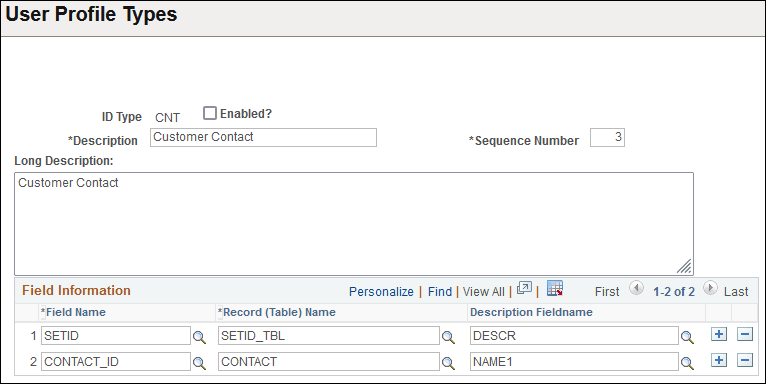
This example illustrates the fields and controls on the User Profile Types page.
| Field or Control | Description |
|---|---|
|
ID Type |
Displays the abbreviated form of the profile type name. |
|
Description |
Enter a name for the profile type that is no more than 30 characters. This value appears on the ID page in the User Profiles component. |
|
Enabled? |
Select this check box to enable a profile type. When selected, you can assign the profile type to user profiles. When deselected, the profile type does not appear in the Profile Type drop-down list box on the User Profile - ID page. Note: Do not enable the ID type until the fields and tables in the Field Information section are defined and built using Application Designer. |
|
Sequence Number |
The SetUserDescr( ) function uses this value. After you assign one or more ID types on the User Profiles - ID page, click the Set Description link and the SetUserDescr( ) function automatically retrieves the value of the record field that you reference in the Edit Table and Description Fieldname fields on the User Profile Types page. If you assign multiple ID types, the sequence number determines which user profile type to use. The function looks to the user profile type with the lowest sequence number and checks for the presence of a value in the description field. If no value exists, the function moves to the next higher sequence number. For example, if you assign a user both the Employee (seq no 1) and Customer Contact (seq no 3) ID types, then the function first looks to the Employee user profile type and retrieves the value in the PERSONAL_DATA.NAME field. If the PERSONAL_DATA.NAME field contains no value, the function looks to the Customer Contact ID type and retrieves the value from the CONTACT.NAME1 field. Note: For user types that list multiple fields, the system uses the Description Fieldname of the last field in the field list. For example, the Customer Contact user profile type lists two fields: SETID and CONTACT_ID. The set user description function uses the Description Fieldname CONTACT.NAME1 corresponding to the last field, CONTACT_ID. |
|
Long Description |
Enter details about a profile type. The maximum length of this field is 250 characters. |
|
Field Information |
The fields that you select enable the User Profiles component to prompt for an ID value when you select a type on the ID page. For example, if the user selects the Employee ID type from the User Profiles - ID page, the system must know the table that contains the valid ID values to display to the user when the user clicks the prompt button. The Edit Table column specifies the record, and the Field Name column specifies the field. You can specify multiple fields if the ID has multiple keys, as is the case of the Customer user profile type where the keys for customer information are SETID and CUST_ID. |