Executing Dynamic Role Rules for All Roles and Users Profiles
To execute a dynamic role rule for all roles and user profiles use the Dynamic Role Rules page (ROLEDYNLAUNCH). To access the page select . The following example shows the Dynamic Role Rules page:
This example illustrates the fields and controls on the Dynamic Role Rules page.
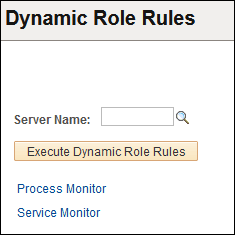
The Dynamic Role Rules page features the following page controls:
| Field or Control | Description |
|---|---|
|
Server Name |
Enter the name of the process scheduler server to run the rule(s). |
|
Execute Dynamic Role Rules |
Click to launch the DYNROLE_PUBL application engine program which executes the rule(s). The application engine program runs through PeopleSoft Process Scheduler. After the DYNROLE_PUBL application engine program runs the rule, it publishes a message, ROLESYNCHEXT_MSG, that contains a list of users in the role. Note: The successful completion of the dynamic roles program does not ensure that your roles were updated; the associated message must also be published successfully. |
|
Process Monitor |
Click to view the status of the DYNROLE_PUBL application engine program in the Process Scheduler Monitor. |
|
Service Monitor |
Click the link to check the status of the publication of the ROLESYNCHEXT_MSG message in the Service Operations Monitor. |