Using the Group Users Page
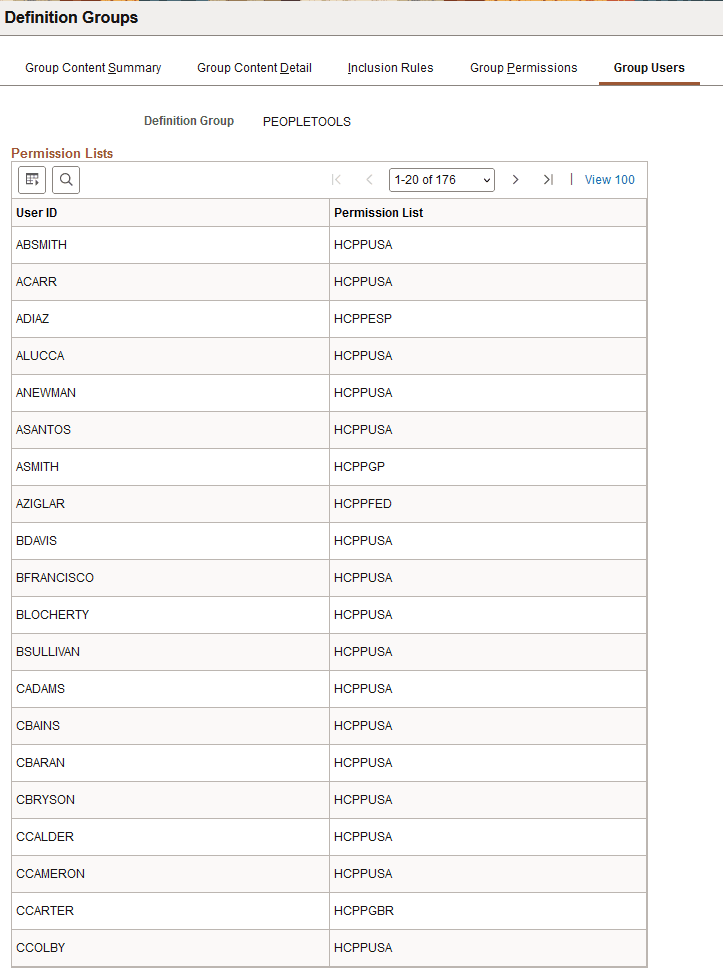
Use the Group Users page (PTDEFSECGRPUSERS) to view the user IDs with access to a definition group and the associated permission list with which they have gained access.
To access the page:
-
Select
The Definition Groups Search page appears.
-
Search for a definition group or add one to the system.
The Group Content Summary page appears.
-
Click the Group Users tab.
This example illustrates the fields and controls on the Group Users page. You can find definitions for the fields and controls later on this page.
| Field or Control | Description |
|---|---|
|
User ID |
The user ID of a user with access to the definitions in the definition group. |
|
Permission List |
The name of the permission list to which the user belongs and with which the user is gaining access to the definition group. |