Using the Prompt Table Overrides Page
Use the Prompt Table Overrides page to set an override prompt table for a field that has a prompt table assigned to it. Using this functionality, a user gets the result set that is selected from the override prompt table; instead of the defined prompt table.
Access the Prompt Table Overrides page by selecting .
The search page shows only those records that have one or more fields with a prompt table defined for it.
This example illustrates the fields and controls on the Prompt Table Overrides page. You can find definitions for the fields and controls later on this page.
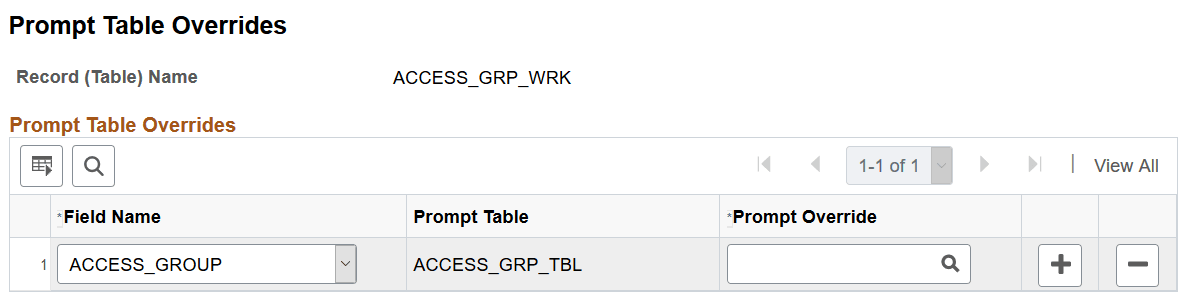
| Field or Control | Description |
|---|---|
|
Field Name |
This is the component search record. It lists only the fields within the selected record that have a prompt table defined for it. |
|
Prompt Table |
The defined prompt table record for the selected field name. |
|
Prompt Override |
Select the appropriate dynamic view. The Prompt Override drop down remains disabled until a field is selected and is limited to records defined as dynamic views whose SQLtext contains %OPRCLAUSE. Note: Choosing a wrong or improperly constructed override prompt table may cause related page errors. |
PeopleCode Considerations
The following Field Class properties are affected:
-
PromptTableName
If the defined prompt table is overridden, then this property returns the override prompt table name instead of the prompt table defined on the record field in Application Designer.
See PeopleCode API Reference: PromptTableName property: Field class.
-
SQLText
If the defined prompt table is overridden, then this property returns the SQL defined in the override prompt table. When this property is used to replace the SQL text being used at runtime, it continues to work as designed.
See PeopleCode API Reference: SqlText property: Field class.