Selecting Business Processes
Access the Business Process List page.
This example illustrates the fields and controls on the Business Process List.
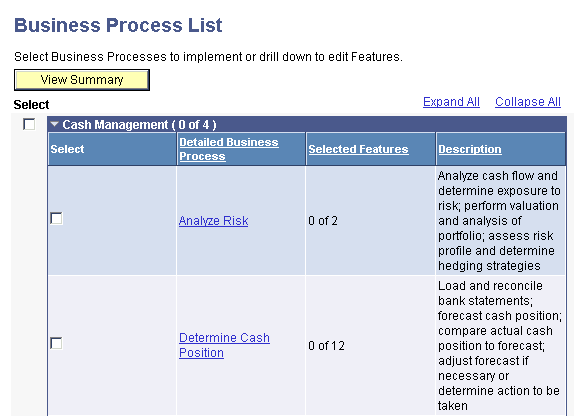
Business processes comprise two categories: high-level business processes and detailed business processes. High-level business processes comprise several detailed business processes. Detailed business processes comprise groups of features that support the detailed business process and, in turn, roll up into the high-level business process.
The Business Process List page comprises several collapsible grids that are labeled with the names of a high-level business process. The grid label also shows the number of detailed business processes that have been selected for implementation out of the total number of detailed business processes supported by one or more of your installed products. The default appearance of the Business Process List page shows all business processes expanded, where each collapsible grid is a list of detailed business processes within the high-level business process. To collapse the high-level business process lists that you don't want to view, click the arrow that precedes the name of the PeopleSoft high-level business process.
If you choose to implement your project based on business processes, select the detailed business process that your company wants to implement, navigate to the underlying features, and select them for implementation. Only those business processes licensed to you and supported by products marked as installed on the PS_INSTALLATION table are available for you to select.
To select all detailed business processes associated with a high-level business process, select the check box to the left of the high-level business process name. As a default, no business processes are selected for implementation. You can select a subset of the features that support an individual detailed business process by clicking the detailed business process name link.
If a selected feature also supports other detailed business processes, the feature is automatically selected for the other detailed business processes where it is referenced. Additionally, the features that you selected on the business process side are also marked as selected for that product when viewing it from within a product suite.