Defining Business Entities in External Companies
To access the Ec Bus Entity Def (Business Entity Definition) page, select .
This example illustrates the fields and controls on the Ec Bus Entity Def page.
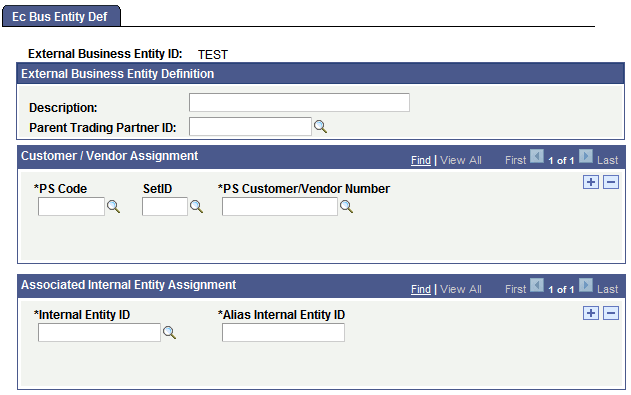
Perform this procedure only if you need to be able to address transactions to multiple business entities that are part of the same external trading partner. This is similar to creating an external partner definition, except that business entities are subordinate to external trading partners and acquire some of their properties. Use this page to define the groups or entities that you deal with inside an external trading partner.
To define business entities in an external trading partner company:
-
Specify which trading partner company this business entity is a part of.
Select the appropriate trading partner ID from the Parent Trading Partner ID field.
When the EDI agent processes a transaction that involves the business entity that you are defining, it will use the map ID, profile ID, and conversion data ID assigned to the parent trading partner.
-
Specify the customer ID or vendor ID for this business entity.
If you want to establish a business entity as a valid trading partner, it must appear as a separate entry in your PeopleSoft database as a customer or a vendor. In the Customer/Vendor Assignment group box, you identify which customer or vendor is referred to by the external business entity ID that you are creating. The system needs this information to determine the customer ID or vendor ID to assign to incoming EDI transactions, and the external business entity ID to assign to outgoing EDI transactions.
In the PS Code field, select the entity code for customers or vendors. If your system uses table set processing, select the setID for the Customer or Vendor table in theSetID field. In thePS Customer/Vendor Number field, select the specific value from the Customer or Vendor table that corresponds to this business entity.
If different tables in the system refer to this business entity by different names, you can list all the IDs as part of the external business entity definition.
-
Identify the internal trading partners who do business with this external business entity, and then save the page.
In the Internal Entity ID field, select the name of an internal trading partner that does business with the external entity you are defining. Then, in theAlias Internal Entity ID field, enter the name by which the new external entity refers to the selected internal partner, that is, the text that will appear in the Internal Trading Partner field in PeopleSoft business documents.
Repeat this step for each internal trading partner.