EDI Overview
EDI is a standard means of exchanging data between companies so that they can transact business electronically. For example, using EDI, a company can submit an order to a vendor, and the vendor can acknowledge and fulfill the order without any paper changing hands or any contact between company representatives.
EDI provides a standard format for transaction data, enabling trading partners to communicate in a common language. When one company needs to initiate a transaction with another, it extracts the transaction data from its database, translates it into the common EDI format, and transmits it over a network to the trading partner. The second company receives the EDI transmission and transfers its data into its transaction processing application.
The EDI process involves several steps.
This diagram shows an overview of the architecture that enables PeopleSoft applications to complete EDI transactions.
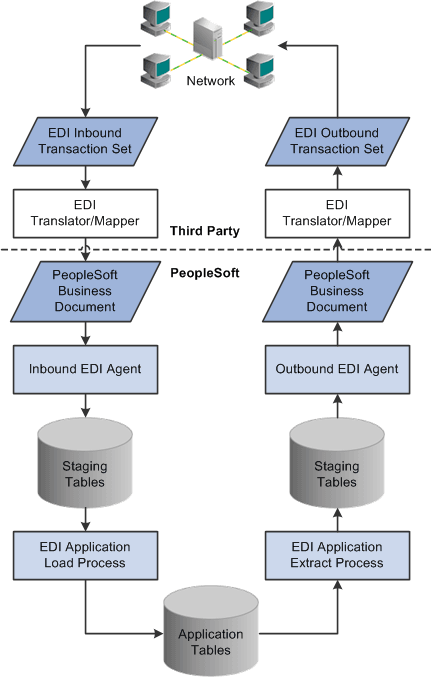
The portion above the dotted line shows the services typically provided by a value-added network (VAN). A VAN provides services related to the exchange of EDI transactions—usually a private network for exchanging EDI transactions, although the network could also be the internet.
For incoming transactions, the transfer to PeopleSoft applications comes when the EDI translation software converts transactions from the standard EDI formats X.12 or EDIFACT into PeopleSoft Business Document format. A PeopleSoft-supplied EDI agent reads the PeopleSoft Business Document files and places their data in staging tables in the PeopleSoft database. An EDI application load Structured Query Report (SQR) transfers data from the staging tables to the appropriate application tables. From there, the data is processed like any other PeopleSoft transaction.
The process for outgoing transactions is similar. You periodically run an SQR that extracts the appropriate data from the application tables and copies it to a set of staging tables. An EDI agent creates PeopleSoft business documents from this data; then the EDI translation software converts the documents into X.12 or EDIFACT format and transmits them to the trading partner.
The portion of the process involving PeopleSoft products has two stages:
-
Based on data mappings that you define, EDI agents copy data between PeopleSoft business documents and the incoming or outgoing staging tables.
-
SQRs transfer data between the staging tables and the application tables, performing any necessary data validation.
You use PeopleSoft EDI Manager to define the mappings that EDI agents use for conversions and to maintain information about your vendors and other trading partners.
The staging tables are a temporary storage area for EDI transaction data. Later, a transaction-specific application load process transfers the data from the staging tables into the application tables.