Jolt Internet Relay Architecture
Jolt Internet Relay provides an environment in which the PeopleSoft web server and application server can be further decoupled. This provides greater security at sites where security is of utmost importance. Jolt Internet Relay routes messages from a Jolt client to a Jolt Server Listener (JSL) or Jolt Server Handler (JSH), and eliminates the need for the JSL, JSH, and Tuxedo application to run on the same machine as the web server. Communication takes place between the JRLY and JRAD elements rather than between the Jolt client and JSL/JSH processes. Traditionally an application server domain opens between 2 and 6 ports for such communications. The use of Jolt relay restricts this to one port per domain on the application server machine. This enables an administrator to open just one port on the application server machine. The following diagram illustrates this feature:
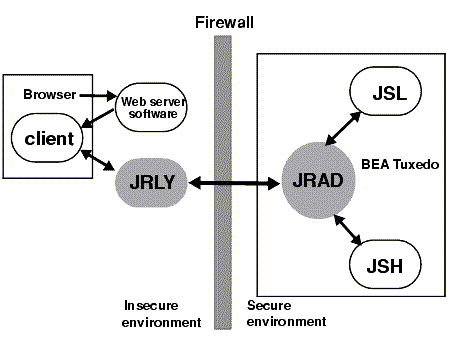
Jolt Internet Relay consists of two elements: Jolt Relay (JRLY) and Jolt Relay Adapter (JRAD). It's important to understand the difference between these two elements.
JRLY consists of a standalone program and configuration file; the program runs on the same machine as the web server. JRLY receives Jolt messages from a PeopleSoft web application and routes those messages to JRAD on the application server. It receives the Jolt message through one port, the LISTEN port, and connects to the JRAD by using another port, the CONNECT port. JRLY is sometimes referred to as a front-end relay.
JRAD runs on the same machine as the application server. It's configured on the application server domain as part of the PeopleSoft PSADMIN domain configuration procedure. JRAD listens for JRLY messages on its LISTEN port and transfers the message to the JSL or JSH. JRAD is sometimes referred to as a back-end relay.
Note:
Implementing Jolt Relay can impede performance. Always perform testing with typical production system load to ensure it will meet your service level requirements.