Maintain URL Properties
PeopleSoft delivers all the necessary properties for use with URL identifiers. File transfers using FTP, SFTP, HTTP, and HTTPS protocols use a third-party library LibCurl. If you need to use non-delivered LibCurl properties, use this page to define them. After defining the property, use the URL Maintenance page to associate the property with the URL.
Select to access the Maintain URL Properties page.
You can also access the page from the URL Properties dialog box.
This example illustrates the fields and controls on the Maintain URL Properties page. You can find definitions for the fields and controls later on this page.
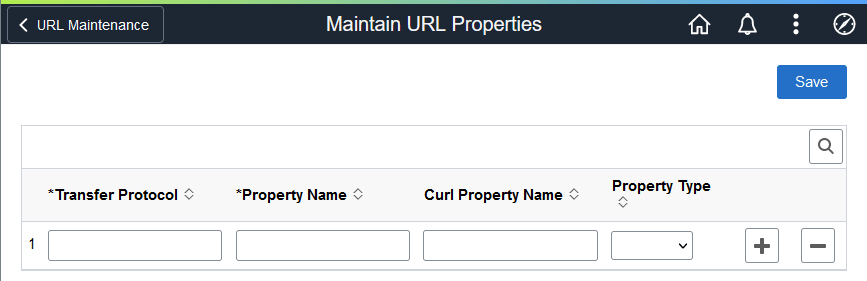
| Field or Control | Description |
|---|---|
|
Transfer Protocol |
Select the protocol to use for file transfer:
|
|
Property Name |
Enter a name to be used in the URL Maintenance page. After you save this page, the property will be available when you create or edit a URL. |
|
Curl Property Name |
Enter a curl property to be associated with the Property Name. The values that you enter will be passed directly to curl. See the curl documentation for allowed values. See https://curl.se/libcurl/c/curl_easy_setopt.html Only the properties of the Integer, String, and Boolean types are supported, with some limitation. Any property (such as enums defined as values, or a property like CURLOPT_WILDCARDMATCH) that requires special handling is not supported. |
|
Property Type |
Select one of these types from the drop-down list:
The values that you enter are passed directly to curl. See the curl documentation for allowed values. |
To make curl properties available for URL definitions:
-
Select .
-
Enter one of the supported protocols for file transfer.
-
Enter a Property Name to be associated with the curl property.
-
Enter a Curl Property Name.
-
Select a Property Type.
-
Click the plus sign to add additional properties as necessary.
-
Save your changes.
-
Select .
-
Add a URL identifier or open an existing URL.
-
Enter the necessary information on the URL Maintenance page.
-
Select URL Properties.
-
Click the lookup icon (magnifying glass) and locate the property name that you associated with the curl property.
-
Enter a value that is allowed for the curl property.
See the curl documentation for allowed values.