Starting and Stopping Single-Server Processes
In a single-server configuration, there's only one server to administer: PIA. You can control the life cycle of the PIA server using scripts, using PSADMIN, or in the WebLogic console.
Scripts
For all platforms:
| Field or Control | Description |
|---|---|
|
startPIA |
Use this script to start the WebLogic server locally. |
|
stopPIA |
Use this script to connect to a locally running WebLogic server and issue a shutdown command through WebLogic APIs. |
Note:
When you shut down the server, a warning is displayed since the shutdown command uses a non-SSL http connection to connect to the WebLogic Server. This shutdown command can be changed to use the SSL connection by editing the stopPIA.sh script.
For Microsoft Windows only:
| Field or Control | Description |
|---|---|
|
installNTservicePIA |
Use this script to register the PIA WebLogic server as a Windows service that runs as a background process. The service is named as WebLogicDomainName-PIA, for example: peoplesoft-PIA. |
|
uninstallNTservicePIA |
Use this script to deregister the PIA Windows service. |
WebLogic Remote Console
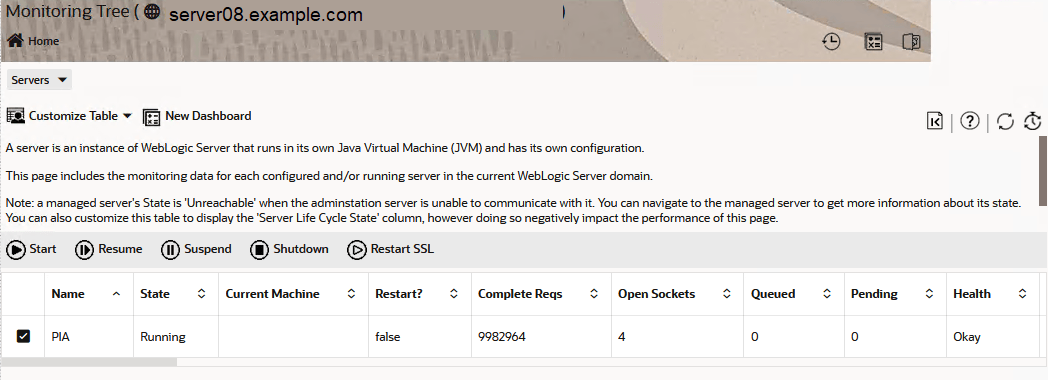
A WebLogic server can also be shut down from the WebLogic Remote Console. See Using WebLogic Remote Console.
Click the Monitoring Tree tile, and then select . Select PIA to enable these controls:
-
Start
-
Resume
-
Suspend
-
Shutdown
-
Restart SSL
This example illustrates a portion of the Monitoring, Servers, PIA page . Several columns in the grid are not shown.