Using the Record Cross Reference Component
Select and search for a Record (Table) Name.
You use the Record Cross Reference component (XREF_PANEL_01) to view where a record is used throughout the application. There are two pages in this page group:
-
Pages, Views, Search Records.
-
Prompts, Defaults, PeopleCode.
Pages, Views, Search Records
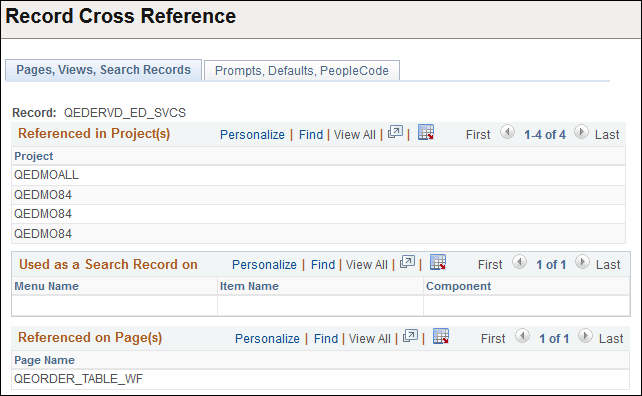
This is a read-only page that shows which Projects, Menus, Pages, and Objects reference a particular record:
This example illustrates the fields and controls on the Pages, Views, Search Records page.
Prompts, Defaults, PeopleCode
On the Prompts, Defaults, PeopleCode page, the group boxes list the components that refer to the record.
This example illustrates the fields and controls on the Prompts, Defaults, PeopleCode page.
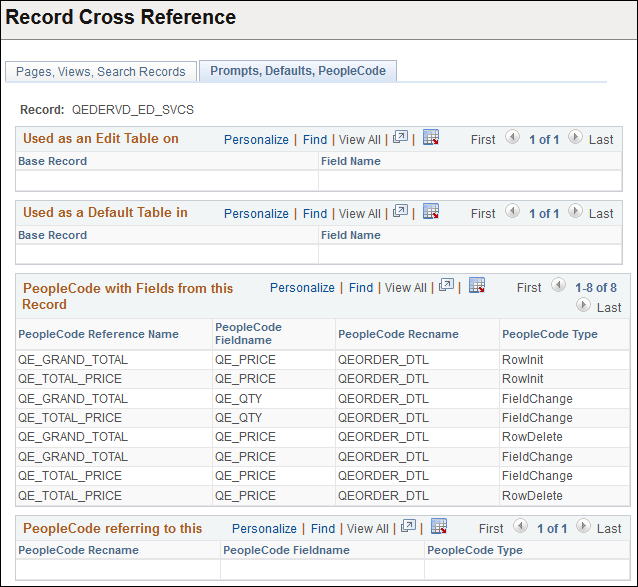
| Field or Control | Description |
|---|---|
|
Used as an Edit Table on |
Lists pages that use the record as edit table. |
|
Used as a Default Table in |
Lists pages that use the record as a default table. |
|
PeopleCode with Fields from this Record |
Shows where fields from this record are used in PeopleCode. |
|
PeopleCode referring to this |
Shows all PeopleCode that references this record. |