Actions for MsgBox Step Type
The following actions are associated with the MsgBox step type, all of the actions use the same parameters.
Parameters
| Parameter | Description |
|---|---|
|
prompt=value; |
The text string displayed in the message dialog box. To include a line break within a text string, use <NL>. For example: prompt=Newline Message Prompt!!<NL>Line1<NL>Line2<NL>Line3 Creates the following text string: |
|
title=value; |
The text string displayed in the title bar of the message dialog box. |
|
ret=&variable; |
The variable name that will store the integer indicating which button the user clicked. |
Return Values
The return value is based on the button that was pressed by the user during test execution:
| Button Pressed | Return Value |
|---|---|
|
OK |
1 |
|
Cancel |
2 |
|
Abort |
3 |
|
Retry |
4 |
|
Ignore |
5 |
|
Yes |
6 |
|
No |
7 |
Example
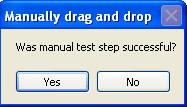
In this example variables are created to store the text for the prompt and title. The message box is created as a YesNo message box. If the Yes button is pressed by the user, the return value will be 6.
| Type | Action | Recognition | Parameters | Value |
|---|---|---|---|---|
|
Variable |
Set_Value |
&TestStep |
|
Manually drag and drop |
|
Variable |
Set_Value |
&Prompt |
|
Was manual test successful? |
|
MsgBox |
YesNo |
prompt=&Prompt;title=&TestStep;ret=&ret |
||
|
Conditional |
If_Then |
&ret=6 |
|
|
|
Log |
Pass |
Manual step &TestStep Passed |
|
|
|
Conditional |
Else |
|
|
|
|
Log |
Message |
Manual step &TestStep Failed |
|
|
|
Conditional |
End_If |
|
|
|
Based on the test steps in the example above, the message box is created.