Editing the DataLoader Step Type
The DataLoader maps a query and the query fields to variables in the test. See DataLoader.
Click the edit button in the Recognition field of the step to open the Edit DataLoader dialog box.
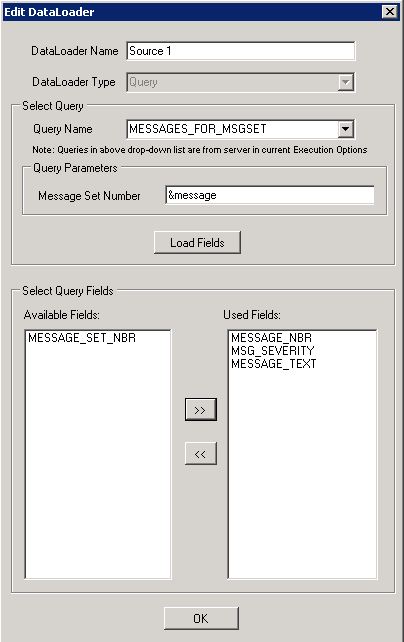
The example illustrates the fields and controls on the Edit DataLoader dialog box with Query Parameters and Select Query Fields sections. You can find definitions for the fields and controls later on this page.
| Field or Control | Description |
|---|---|
|
DataLoader Name |
Enter an unique name that associates the test with the query. |
|
DataLoader Type |
Currently it displays Query and is disabled for change. |
|
Query Name |
Select the required query from the drop-down list. Note: Queries displayed are according to the Query Security settings associated with your User ID in current Runtime Options. |
|
Query Parameters |
Enter the parameter values. The section appears if the selected query has associated parameters. |
|
Load Fields |
Click the button to select the query fields from the list of available fields. |
|
Select Query Fields |
Displays the fields used in the query. Select and shift required query fields under Available Fields to Used Fields. Note: The Available Fields displays only unique field names. |
When you click the OK button on the Edit DataLoader dialog box, the variable mapping grid appears where you can edit variable names.
The example illustrates the fields and controls on the variable mapping grid for the DataLoader instance.
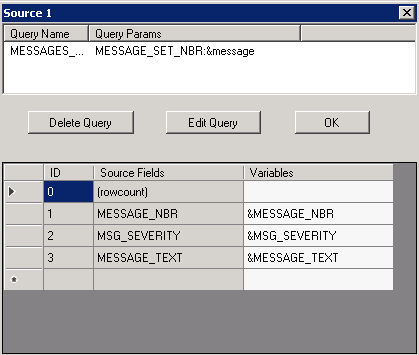
You can edit the variable name on the grid for the source fields.
Click the Edit Query button to open the Edit DataLoader dialog box to edit the query.
Note:
The first row in the variable mapping grid is reserved for the rowcount variable which populates the total rows in the query result. The rowcount is used for a loop definition. Variable name of the (rowcount) field is blank by default. If you want to use the rowcount variable then you must provide a variable name.