Exec_Private
Description
Runs a private query in PeopleSoft Query and downloads the results.
Parameters
| Parameter | Description |
|---|---|
|
outFile=value; |
The query output file. |
|
outFolder=value ; |
The folder where the result will be saved. If this parameter is missing, the system will use the value in the Local Options dialog box. |
|
outFormat=value; |
The file format that will be used to download the result file. If this parameter is missing, the system will use the value in the Local Options dialog box. |
|
param=value; |
The list of comma delimited values for all the query parameters. |
|
0rows=value; |
If the query returns zero rows, add a log entry of type value. Valid values are Pass, Fail, or Warning. |
|
Nrows=value; |
If the query returns one or more rows, add a log entry of type value. Valid values are Pass, Fail, or Warning. |
Note:
Query steps do not support simultaneous usage of both 0rows= and Nrows= parameters in the same step.
Use the following formats to specify query parameters:
| Page Control | Format |
|---|---|
|
Text |
param=value |
|
Radio button |
param={RB}value |
|
Combo box |
param={CB}value |
|
Check box |
param={CH}value |
|
Text box |
param={EB}value |
Example
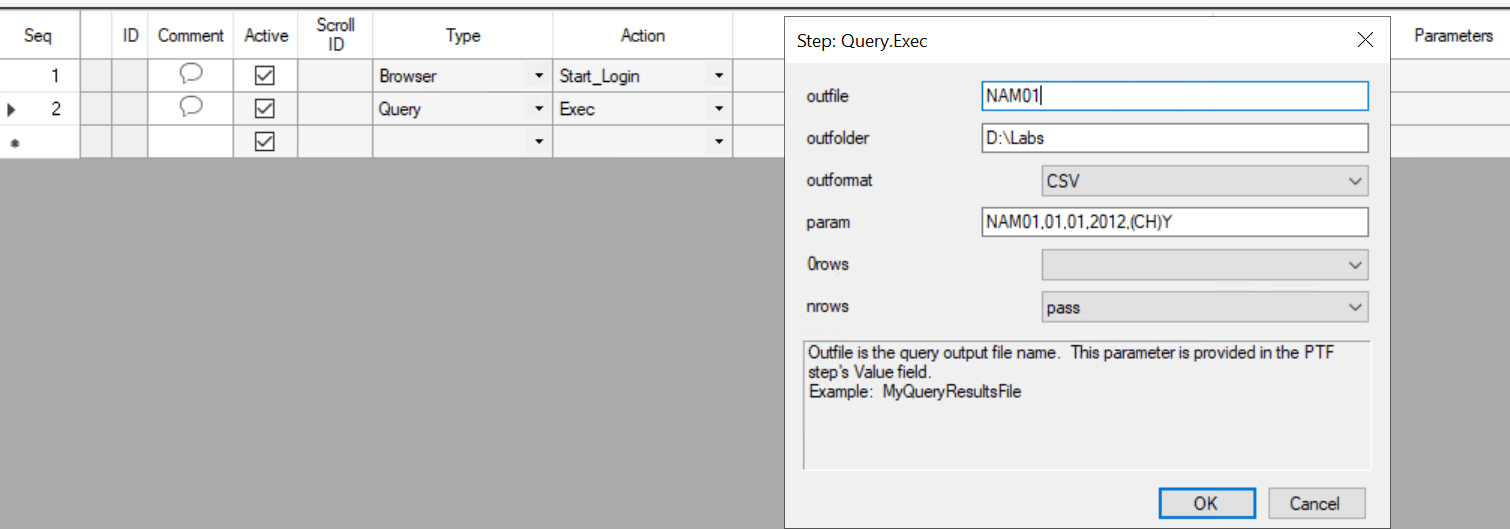
This example shows the Query.Exec step type, with the dialog box for the values open. In this example, the query has 3 prompts: a text field, a date field and a check box. The query is expected to return rows.
This example illustrates entering the value parameters for the Query.Exec action.