Modifying Recorded Steps
You can modify steps recorded during the current session by pausing the session and editing the step in the PTF Recorder.
Fields or controls for modifying steps.
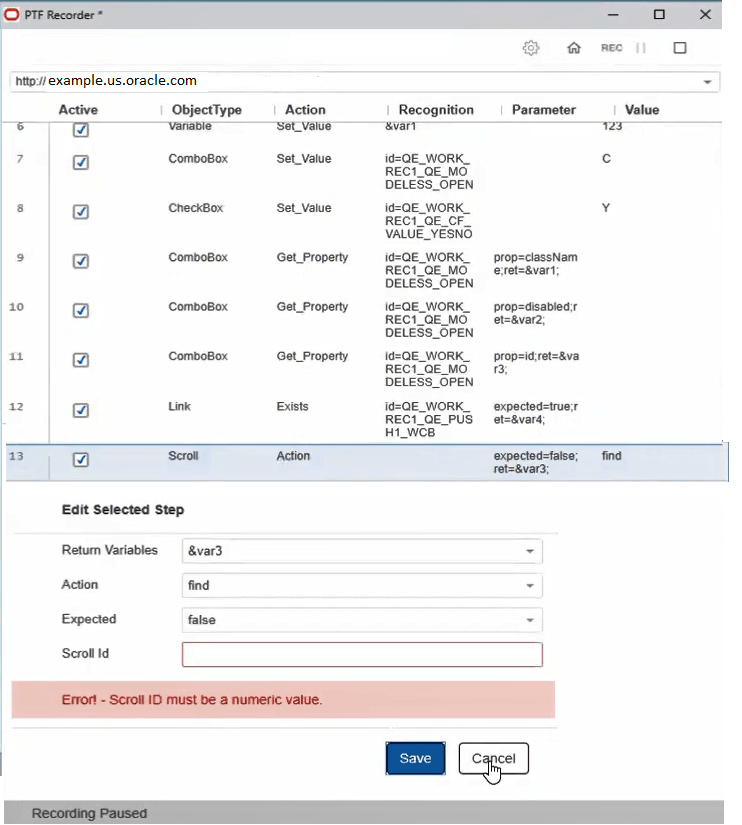
When the recording is paused, the PTF Recorder becomes active where you can highlight a recorded step and edit any of its values.
You can enable or disable the recorded steps by selecting or clearing the Active option.
The Edit Selected Step window appears when you highlight a recorded step to edit. The editable parameters of the selected step are displayed in this window.
If you enter incorrect parameter value, an error message is displayed in red.
Get_Property, If_Then and Scroll_Action are examples of action steps that can be edited.