Understanding Interactions Between Tree and User Data Effective Dates
User data are information collected from customers. When user data also has an effective date on key record, PeopleSoft Tree Manager checks that date to determine which dated record item belongs in the current dated tree. When only one dated item is in the user table, then the date determines whether that item is available for use in the tree at all.
Trees and user data differ in how effective dates are considered in respect to the current date and when the tree and the data come into scope. The rules are:
-
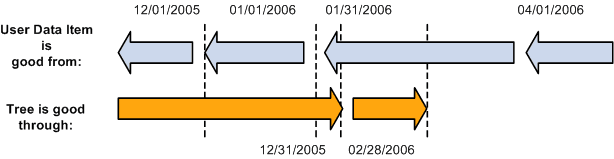
The tree’s effective date is the good through date for the tree’s representative organization.
-
The user data item’s effective date is the good from date for the user data.
Therefore, in a particular tree, the nodes and details valid for that tree must have an effective date on the user data record earlier or the same as the effective date on the tree.
The following table presents an example of an effective-dated tree with a user table that has three effective-dated records for the same item.
| Tree Effective Date | User Item Effective Date | User Data Available to Tree? |
|---|---|---|
|
12-31-2005 |
12-01-2005 |
Yes |
|
12-31-2005 |
01-01-2006 |
No |
|
12-31-2005 |
01-31-2006 |
No |
|
12-31-2005 |
04-01-2006 |
No |
The following table shows the actions when the tree is copied to a new effective date, with the same user data records.
| Tree Effective Date | User Item Effective Date | User Data Available to Tree? |
|---|---|---|
|
02-28-2006 |
12-01-2005 |
Yes |
|
02-28-2006 |
01-01-2006 |
Yes |
|
02-28-2006 |
01-31-2006 |
Yes |
|
02-28-2006 |
04-01-2006 |
No |
This diagram illustrates a graphical representation of user data and tree effective dates.