Viewing Detail Values
Use the Detail Value List page to view the range of values in a detail or dynamic detail.
Navigation:
-
Select
-
Search for an existing tree or create a new one.
-
Select a detail value on the Tree Manager page and click the Edit Data icon.
Alternatively, select the bracket under a dynamic detail on the Tree Manager page, and click the Edit Data icon.
Note:
The Detail Value List page is available only for detail ranges. This page is application defined.
This example illustrates the fields and controls on the Detail Value List page – QEDMO Employee. Definitions for the fields and controls appear following the example.
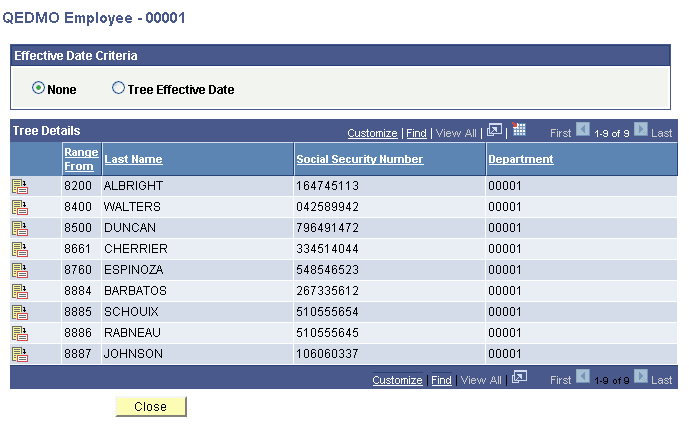
| Field or Control | Description |
|---|---|
|
Effective Date Criteria |
Select the None option to display all EFFDT data rows for ranged or dynamic tree details, including future EFFDT data. Select the Tree Effective Date option to display EFFDT detail data with EFFDT less than or equal to a Tree EFFDT. Note: Future EFFDT detail date is not displayed if the Tree Effective Date option is selected. |
|
Customize |
Click to change the column or sort order. |
|
|
Click the Update icon to select the required detail value. |

This page lists the values in a range, or the values in a dynamic detail, depending on the node that you selected to access the page. In a normal detail tree, a specific value or range of values defines each node. A dynamic detail tree determines the value by matching the node name with a field on the value table.
Dynamic detail trees use the parent node name as a key to select the detail values.
Values are stored and compared as strings, not numbers. Therefore a range of values identified by numbers may include more values than anticipated. For example, a company contains the following departments: 0107, 1000, 1002, 1010, 1090, 1100, 1779, and 1869. If you specify a range of departments from 1000 to 1090, the values included would be 1000, 1002, 1010, and 1090 because the first three characters of these departments fall in the range between 100 and 109.
Although the number 10699999 is greater than 1090, when you use a string, the length of the value does not matter. For example, a range of words between CAP and CAT includes the word CARTWHEEL.