Understanding Worklist Replication
To consolidate worklists from multiple databases, use the worklist replicate process.
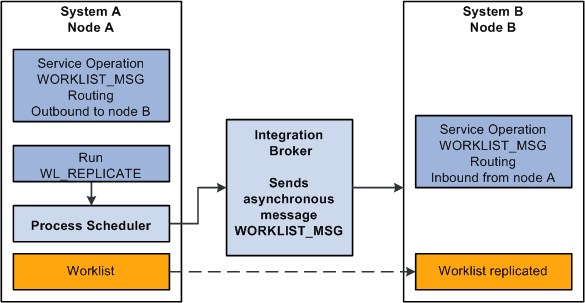
This example illustrates the objects used to replicate worklists between two systems. The worklist replicate process depends on the WORKLIST_MSG service operation definition. The WORKLIST_MSG definition must be active and it must have a valid PeopleSoft Integration Broker routing defined for the worklist replicate process to work. This process uses use the Worklist Replicate (WF_WL_REPLICATE) component to run the replication process.
Note:
Every worklist item has a worklist name—for example, Expense Report Approval, Order Item, and so on. For worklists to replicate successfully, you cannot generate identical worklist names in multiple databases; one database must be the “master” for each worklist name.
Worklist Replication Considerations
When replicating worklists between databases, keep the following behavior in mind.
This PeopleSoft application formats the Worked By Activity field by examining the worklist definition in the target database. If the activity definition is not in the target database, the system cannot format the Worked By Activity field. So, in some cases, this field may appear blank after replication, and as long as the WORKEDBYACTIVITY is not defined in the target database, this field is blank. These are the solutions to this problem:
| Database Version | Solution |
|---|---|
|
Databases at the same release level (8.4x to 8.4x) |
From the source database, export the replicated worklist definition (activity) and the worked-by activity (if they are not the same). Import the definitions into the target database. |
|
Databases at different release levels (8.1x to 8.4x) |
Manually recreate the activity in the target database. |
Note:
If the worklist status in the source database has been changed to complete or canceled, the target database status will not change until the next replication run. In this case the target database may show the worklist as available but will not find it when clicking the link.