About the Multi-Value Field
The Multi-Value Field is a business component field that contains the name of the multi-value link (MVL) in the Multi Value Link property and a check mark in the Multi Value property. All other business component fields are single-value fields. A multi-value field contains data from a record in the child business component because of the MVL.
To search the parent applet for all parent records that contain a child record that holds a field value, then you must use a multi-value field.
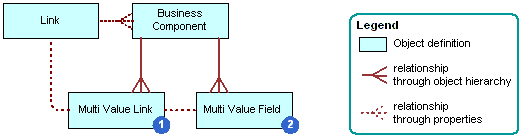
The following table describes some properties, as illustrated in the following figure, of the multi-value field.
| Number (as shown in preceding figure) |
Property | Description |
|---|---|---|
|
1 |
Multi Value Link |
Identifies the MVL that provides values through the link from the child business component. A multi-value field in the parent business component contains data that Siebel CRM gets from the current record in the child business component through the MVL and link. The Column property of a multi-value field is empty because Siebel CRM gets values from the current record in the child business component rather than from the base table of the parent business component. |
|
2 |
Field |
Identifies the field in the parent business component that provides values for the field in the child business component. Siebel CRM provides these values through the MVL object and the link object. |
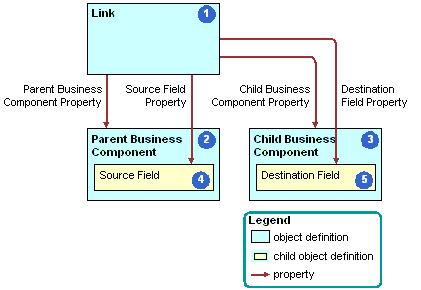
As shown in the following figure, a link (1) contains the following properties:
- (2) Parent Business Component – (4) Source Field.
- (3) Child Business Component – (5) Destination Field.
In Viewing an Example of a Multi-Value Group Applet, the Street Address multi-value field in the Account parent business component contains data from the primary record of the multi-value field in the child business component.
For more information, see How Siebel CRM Sorts a Multi-Value Field and Activating a Multi-Value Field.