Certificate Requirements for Communications
Siebel installer for Siebel Business Applications enforces HTTPS during installation, as follows:
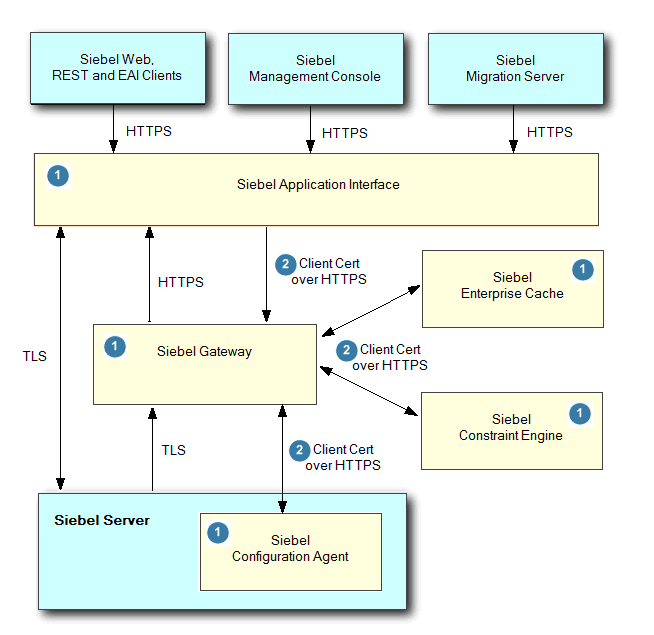
Siebel Web Clients, Siebel Management Console and the Siebel Migration server all communicate with the Siebel Application Interface over HTTPS.
All communication between Siebel services (Siebel Application Interface, Siebel Gateway, and Siebel Configuration Agent) are enforced over HTTPS by Siebel installer.
Siebel Application Interface is an external interface accessing Siebel services. All other Siebel services are internal services and they are protected by client certificate based authentication.
Any Siebel service-to-service access is over HTTPS with client certificate based authentication (for example, two-way SSL). Client certificates are used for service-to-service authentication.
The following figure illustrates the certificate requirements for communications as follows:
-
Siebel Application Interface, Siebel Gateway, and Siebel Configuration Agent are hosted in application containers (Apache Tomcat).
For information on configuring application containers, see Siebel Installation Guide. For information on starting and stopping application containers, see Siebel System Administration Guide.
-
During Siebel installation (of the aforementioned components), the installer prompts you to specify valid Server Keystore, Client Keystore and truststore files, as follows:
-
Server Keystore Name. Specify a file (such as a JKS file) you have generated that will serve as the server keystore. Import the server authentication (serverAuth) certificate (and its private key/certificate chain) into this keystore using the Java Keytool utility. Use this keystore for Siebel server endpoints (for example, Tomcat connectors for External and Internal Application Interface and the Siebel Gateway TLS server configuration).
-
Client Keystore Name. Specify a file (such as a JKS file) you have generated that will serve as the client keystore. Import the client authentication (clientAuth) certificate (and its private key/certificate chain) into this keystore using the Java Keytool utility. Use this keystore for mutual TLS (mTLS) client certificate based authentication for Siebel service-to-service communication and for Java clients making HTTPS calls.
Note: Publicly trusted TLS/SSL certificates issued after the CA deadlines may not include the Client Authentication EKU and therefore cannot be used as mTLS client certificates. Use an internal/private CA (enterprise PKI) for the client keystore where client authentication is required. -
Truststore Name. Specify a file (such as a JKS file) you have generated that will serve as the truststore. For example, import the Certificate Authority (CA) certificate into truststore using the Java Keytool utility.
The two scenarios during Siebel Update with respect to certificate selection are as follows:
-
Scenario #1: Updating pre-26.3 environment to 26.3 but still have old (both serverAuth and clientAuth EKU) combined hybrid certificates. No action required. It will continue to work till certificate expiry.
Note: If you are installing a fresh 26.3 environment but still using combined certificates (both serverAuth and clientAuth EKU). Specify the same keystore for both serverAuth and clientAuth during installation. -
Scenario #2: Updating pre-26.3 environment to 26.3 but have separate certificates. Manually change the serverkeystore and clientkeystore details.
Note: If you are installing a fresh 26.3 environment with separate certificates. Follow the prompts and specify the correct keystores.-
Changes required in
applicationcontainer_internalandapplicationcontainer_external ..\conf\server.xml:<Connector ...> <SSLHostConfig> <Certificate certificateKeystoreFile="path of serverkeystore" certificateKeystorePassword="xxxx" certificateKeystoreType="JKS" /> </SSLHostConfig> </Connector> -
Changes required in
applicationcontainer_internal\webaps\gateway.properties:KeyStoreType=JKS KeyStoreName=<<path of clientkeystore>> KeyStorePassword=<<value>> ServerKeyStoreType=JKS ServerKeyStoreName=<<path of serverkeystore>> ServerKeyStorePassword=<<value>> -
Changes required in
applicationcontainer_external\webaps\applicationinterface.propertiesandapplicationcontainer_external\webaps\migration.propertiesfiles:KeyStoreType=JKS KeyStoreName=<<path of clientkeystore>> KeyStorePassword=<<value>>
-
Since Siebel internal nodes are configured for client certificate based authentication, make sure that you use the correct client identity in the CN and Subject Alternate Name (SAN) fields. You can create certificates with the exact FQDN or IP address, or with a wildcard in the FQDN. For example, if you replace
host.domain.subdomain.comwith*.domain.subdomain.com, then this eliminates the need to create separate client certificates for each machine.Note: It is recommended that you use certificates provided by a Certificate Authority (CA) rather than self-signed certificates for server certificates and use internal CA signed or self signed certificates for client certificates used for mTLS. For production environments, you must create a certificate request and get it signed either by your internal CA (for employee-only environments) or an external CA (for customer, consumer, or partner environments). Self-signed certificates are suitable for development environments, for example, where you can provide instructions to users to import the self-signed certificate, since clients will not trust such a certificate unless it is manually installed into the certificate store.For more information, see About Generating Server Keystore, Client Keystore and Truststore Files and Modifying Server Keystore, Client Keystore and Truststore Files.
-
-
Password. Specify the password for the specified keystore and truststore files.
-
Confirm Password. Confirm the password for the specified keystore and truststore files.
Note: The Siebel Gateway requires that client connections from the Siebel Application Interface be authenticated using a client certificate (mutual authentication). As such, the SSL certificate on the Application Interface must have two certificates, client certificate for client authentication and server certificate for server authentication.. When requesting the certificate, ensure that it will include"clientAuth"for client certificate and"serverAuth"for server certificate Extended Key Usage Attributes. These are typically included in certificates issued by commercial Certificate Authorities, but may or may not be included by default in certificates issued by an internal CA
-
For more information about certificate files, see About Importing Certificates into Keystore and Truststore and About Installing Certificate Files.