Downloading and Using the Siebel Mobile Archive File (Administrator Task)
Instead of downloading the Siebel app and installing it on a mobile device as described
in Downloading and Installing the Siebel App, administrators can copy SiebelMobile.zip file from Siebel
Tools installed home directory.
Prerequisite Software
Make sure you have a proper internet connection.
On Windows laptops:-
Node.js v22.13 Refer link, https://nodejs.org/download/release/v22.13.0/.
-
JDK 17. Refer link, https://www.oracle.com/java/technologies/javase/jdk17-archive-downloads.html.
-
Android Studio and Android SDK Refer link, https://developer.android.com/studio.
Note: Multiple Android SDK versions will get mapped post Android Studio installation in SDK Manager. You need to select API level 35/36.
On Mac laptops:
-
Node.js v22.13 Refer link, https://nodejs.org/download/release/v22.13.0/.
-
JDK 17. Refer link, https://www.oracle.com/java/technologies/javase/jdk17-archive-downloads.html.
-
Android Studio and Android SDK Refer link, https://developer.android.com/studio.
-
Xcode 26.4 Refer link, https://developer.apple.com/xcode.
Set Up the Environment
- Copy the
SiebelMobile.ziparchive file. - Extract the
SiebelMobile.ziparchive file to<PROJECT_ROOT>\RNMobile\.The project root folder becomes
<PROJECT_ROOT>\RNMobile\Siebel.
Prepare the IPA File
On Mac laptops:
- In terminal, navigate to
<PROJECT_ROOT>\RNMobile\Siebel\iosfolder and execute thepod installcommand. - Navigate to
<PROJECT_ROOT>\RNMobile\siebel\ios\siebel\Info.plist.- Change
<string>Release_Version</string>with the appropriate build label.Example:
<string>23.9</string> -
Add a domain list which need to be allowed in the Siebel app:
<key>WKAppBoundDomains</key>
<array>
    <string>*.oracle.com</string>
    <string>domain1</string>
    <string>domain2</string>
  ....
</array>
- Change
-
Open the Xcode application using below command in a terminal and navigate to
<PROJECT_ROOT>\RNMobile\siebel\ios.- Execute command
open siebel.xcworkspace. - With above command it should open the project in Xcode.
- Add the Apple signing profile details matching to your company account details.
- Clean the Build Folder from the Product menu.
- Build from the Product menu.
- Select Any iOS Device option from Product > Destination menu item.
- Archive the project from the Product menu.
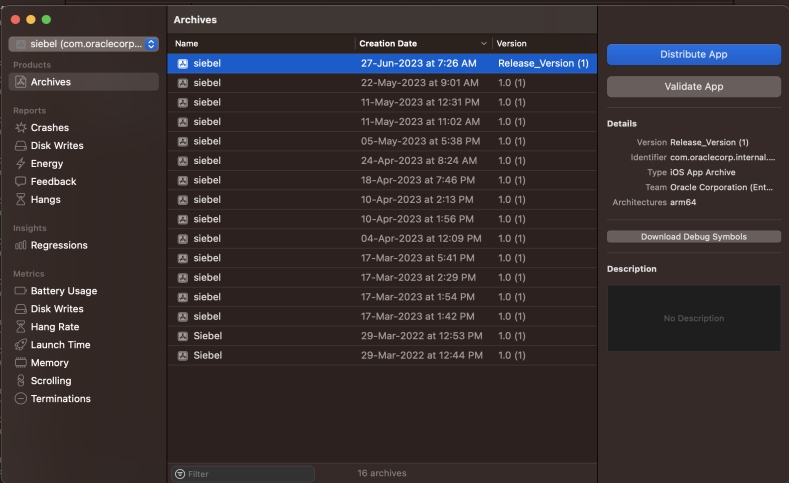
A successful archive looks something like this image:
- Select the Distribute App button and select Custom, and then Enterprise option.
- Select the All compatible device variants option from the drop-down menu next to App Thinning.
- Select the IOS in house profile and certificate.
Let the Thinning app package load.
- Select export after successful processing.
- Once you click export, you can see a folder with all the app versions after thinning.
- Pick
siebel.ipafrom the list to use in the devices.
- Execute command
Or, the IPA file can be generated with the below commands.
-
xcodebuild clean archive -scheme siebel -configuration Release -archivePath <PROJECT_ROOT>/siebel/ios/deploy/iOSDebug/Destination_Root/Siebel.xcarchive -workspace siebel.xcworkspace DEVELOPMENT_TEAM=’<value>’ PROVISIONING_PROFILE=’<value>’Example:xcodebuild clean archive -scheme siebel -configuration Release -archivePath <PROJECT_ROOT>/siebel/ios/deploy/iOSDebug/Destination_Root/Siebel.xcarchive -workspace siebel.xcworkspace DEVELOPMENT_TEAM='VYAKS7W7VC' PROVISIONING_PROFILE='Oracle ENT2' CODE_SIGN_IDENTITY='iPhone Distribution: Oracle Corporation (Ent 2)' -
xcodebuild -exportArchive -archivePath<PROJECT_ROOT>/siebel/ios/deploy/iOSDebug/Destination_Root/Siebel.xcarchive -exportPath Siebel.ipa -exportOptionsPlist iosExportOptions.plist -configuration Release
To deploy on an IOS simulator:
In terminal, execute command npx react-native run-ios from
<PROJECT_ROOT>\RNMobile\siebel.
Prepare the APK File
Navigate to and open file
<PROJECT_ROOT>\RNMobile\siebel\android\app\build.gradle.
Search for defaultConfig section and replace Release_Version with appropriate build label.
On Windows laptops:
- Find the
local.propertiesfile in the<PROJECT_ROOT>\RNMobile\siebel\androidfolder. Correct the path value for thesdk.dirparameter. This is required only for Android.Example:
sdk.dir=C:\\Users\\<Username>\\AppData\\Local\\Android\\Sdk - Add following environment variables (the values are for your reference; use the relevant
value, in your case) in the system variables section:
- Variable=ANDROID_HOME
Value=\Users\<Username>\AppData\Local\Android\Sdk - Variable=ANDROID_SDK_ROOT
Value - \Users\<Username>\AppData\Local\Android\Sdk - Variable=JAVA_HOME
Value - C:\Program Files\Java\jdk-11 -
Update Variable=Path with new values:
\Users\<Username>\AppData\Local\Android\Sdk\emulator\\Users\<Username>\AppData\Local\Android\Sdk\platform-tools\
- Variable=ANDROID_HOME
-
Search for the Windows Powershell in WIN programs. Right-click the mouse and open in Administration mode.
- Navigate to the folder path
<PROJECT_ROOT>\RNMobile\siebel\android. - Execute these commands:
./gradlew clean./gradlew build./gradlew assembleReleaseGenerates the apk file in the path
<PROJECT_ROOT>\RNMobile\siebel\android\app\build\outputs\apk\release.
- Navigate to the folder path
To deploy on an Android emulator:
- Execute the command
cd ..(to move back to the root folderC:\RNMobile\siebel). - Execute the command
npx react-native run-android.If you get the error
'react-native' is not recognized as an internal or external command, operable program
       or batch file
, then, execute the commandnpm install -g react-native-cli.
On Mac laptops:
- Find the
local.propertiesfile in<PROJECT_ROOT>\RNMobile\siebel\androidfolder and correct the path value for thesdk.dirparameter.For example:
sdk.dir=/Users/{mac
       user}/Library/Android/sdk
. - In terminal, navigate to
<PROJECT_ROOT>\RNMobile\siebel\androidfolder and execute these commands:chmod +x gradlew./gradlew clean./gradlew build./gradlew assembleReleaseGenerates apk file under path
<PROJECT_ROOT>\RNMobile\siebel\android\app\build\outputs\apk\release
To deploy on an Android emulator:
In terminal, execute the command npx react-native run-android from
<PROJECT_ROOT>/siebel.